|
<< Click to Display Table of Contents >> Compass Control |
  
|
|
<< Click to Display Table of Contents >> Compass Control |
|
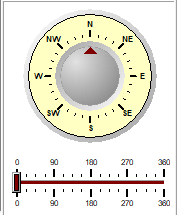
The compass on the bottom right shows the current direction for North. When the application is started this is at the top of the screen. To change the direction (heading) slide the bar to the left or right below the compass.