|
<< Click to Display Table of Contents >> Internet Settings Tab |
  
|
|
<< Click to Display Table of Contents >> Internet Settings Tab |
|
This tab is used to control the settings for the Internet.
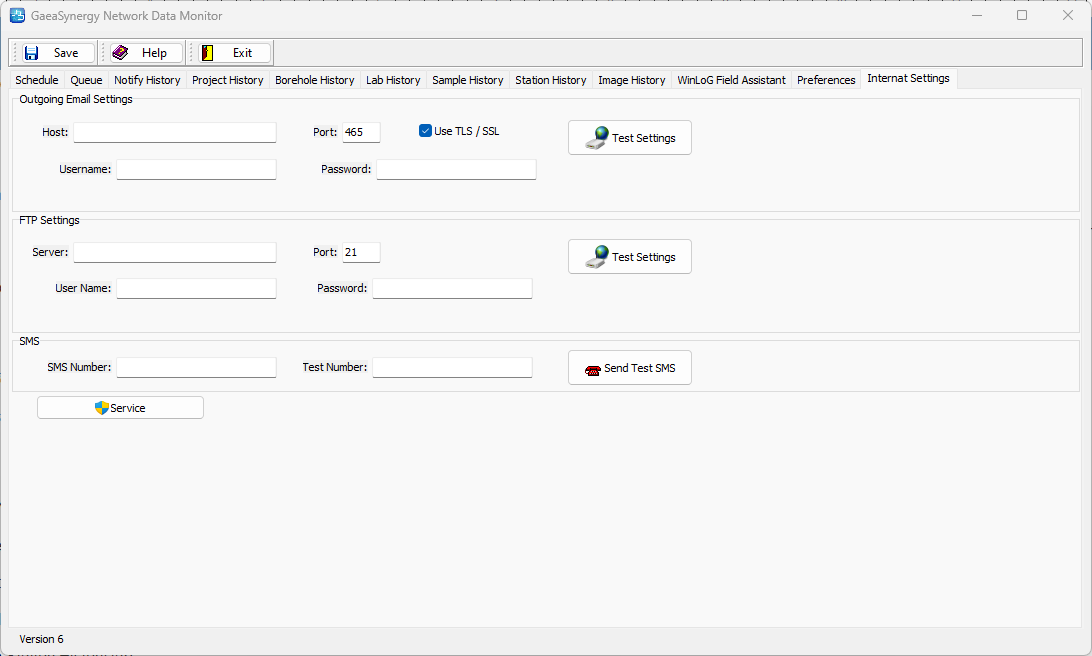
The following can be specified on this tab:
Outgoing Email Settings
Host: This is mail server for outgoing EDIs and notification emails.
Port: This is the port for the outgoing server.
Use TLS/SSL: Check this box if the outgoing server requires TLS/SSL.
Username: This is the username for the outgoing server.
Password: This is the password for the outgoing server.
Test Settings: Click this button to test the settings for outgoing email.
FTP Settings
Server: This is FTP server for outgoing and incoming EDI's and notifications.
Port: This is the port for the FTP server.
Username: This is the username for the FTP server.
Password: This is the password for the FTP server.
Test Settings: Click this button to test the settings for FTP.
SMS
Outgoing Number: This is the outgoing number used to send SMS notifications. It is usually provided by GAEA.
Test Number: This is used to enter a test number to test the SMS.
Send Test SMS: Click this button to send a test SMS to the test number.
Service: This button can be used to retrieve and import data from the WinLoG Data on the FTP site, rather then wait for the service to do it.