


Did you know that 70% of errors in construction projects arise from miscommunication and human mistakes? This is particularly alarming in foundation designs, where accurate geological and logging data are critical. In this blog post, we will explore how digital logging, particularly using the WinLoG Field Assistant on Android tablets, can significantly reduce these costly errors. You’ll learn about the advantages of digital logging, common pitfalls of manual logging, and actionable best practices to enhance the accuracy and efficiency of your data collection process.
1. Introduction to Logging Mistakes
In the construction and engineering industries, precise logging is crucial for the success of any project. Manual errors in logging can lead to decisions that cause project delays, safety hazards, and increased costs. For instance, misrecording borehole depths or misclassifying soil types can drastically affect foundation integrity and project outcomes. A 2019 study indicated that construction projects relying on manual data entry faced higher costs and regrettable delays due to these preventable errors.
2. Understanding Digital Logging
Digital logging incorporates advanced technology tools, facilitating the gathering, storage, and analysis of geological data effortlessly. Unlike traditional methods that rely heavily on manual inputs, digital logging utilizes the WinLoG Field Assistant, designed to minimize human transcription errors. This tool can quickly capture data through Android tablets, instantly documenting information in an easily analyzable format for efficient project management.
3. Costly Consequences of Manual Errors
Now let’s address why the shift from manual logging to digital logging is essential. Here are the consequences you may face due to errors in manual logging:
- Foundation Failures: A simple mismeasurement in depth can lead to insufficient footings, resulting in structural failures.
- Increased Construction Delays: Fixing erroneous data takes time and resources, extending project timelines and costs.
- Safety Risks: An inaccurate logging record can lead to dangerous construction conditions, endangering worker safety.
4. Benefits of Digital Logging with WinLoG Field Assistant
Switching to a digital logging environment using WinLoG Field Assistant provides numerous advantages:
- Instant Data Capture: Data is logged on-site in real-time, ensuring accuracy and reducing the likelihood of errors.
- Enhanced Accuracy: Automated systems double-check entries, significantly curbing human errors, and improving overall data quality.
- Accessibility: With your data stored digitally, retrieving logs is streamlined and efficient, eliminating hassle associated with physical documentation.
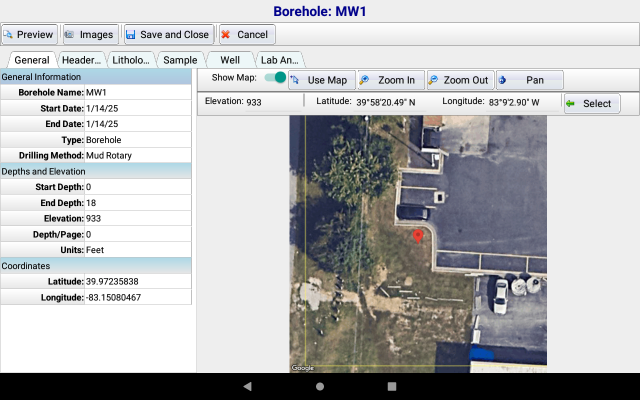
5. Implementing Digital Logging Using WinLoG Field Assistant
Transitioning to WinLoG Field Assistant can be a seamless process if you follow these steps:
- Step 1: Assess Your Current Manual Logging Processes
Identify issues with your current methods, pinpoint frequent mistakes in your logs, and understand how transitioning can alleviate challenges. - Step 2: Plan Your Transition
Devise a timeline for implementation allowing your staff to adjust without disrupting active projects. Training can help get teams acquainted with the new system. - Step 3: Data Migration Process
Transfer existing data into the WinLoG platform. WinLoG Field Assistant facilitates a straightforward data migration process, avoiding potential data loss. - Step 4: Start Collecting Data with Confidence
Make sure every user understands the importance of accuracy right from day one, as effective logging begins with vigilant data entry. - Step 5: Continuously Analyze and Optimize
Regularly review your digital logs and processes. Find areas of improvement, and adjust your methodologies to current project requirements.
6. Best Practices for Successful Digital Logging
To maximize the benefits of using WinLoG Field Assistant, consider implementing these best practices:
- Establish Standard Operating Procedures
Create straightforward guidelines for how team members should conduct digital logging, explaining expectations and responsibilities clearly. - Maintain Rigorous Testing and Maintenance
Ensure that all digital logging tools are frequently tested and updated to prevent unnecessary equipment errors or failures over time. - Provide Regular Training Sessions
Offer continual training to familiarize your team with evolving technology and best practices in digital logging.
What To Do Next?
Incorporating digital logging through WinLoG Field Assistant on Android tablets is essential for avoiding the costly manual errors that threaten effective foundation designs. The switch not only enhances overall accuracy and efficiency but also strengthens safety protocols leading to project success. If you want to ensure your construction projects run smoothly and profitability remains high, you can take actionable steps today to implement these solutions.
Learn more about how the WinLoG Field Assistant can optimize your logging processes and prevent errors that can cost you money.
Remember, enhancing your logging practices today will lead to safer and more successful projects tomorrow!