

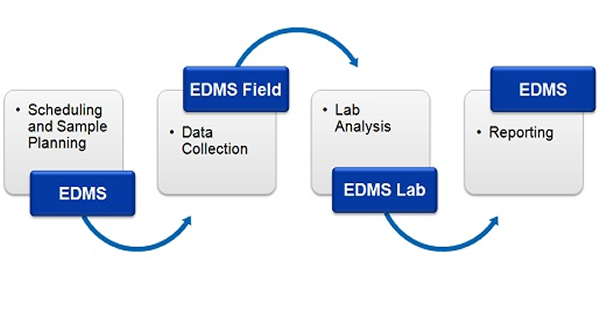
June 2016: The Environmental Data Management System (EDMS) is used to improve and standardize environmental data collection, management, and reporting in an efficient and cost-effective manner. This is accomplished by implementing a documented, auditable process for the collection, storage, and reporting of environmental field data. Throughout this process all stages of the sampling and analysis are tracked and notifications can be sent via email or SMS (text message). Notifications for non-compliance events and sample exceedences can be automatically sent by the system.
This process can be divided into four stages:
- Scheduling and Sample Planning: The first stage in any environmental field program is the scheduling and planning of sampling events. EDMS allows project managers to design, delegate, and monitor sampling events. Sampling events can be either singular or re-occurring. Prior to data collection, sampling stations can be specified. These sample stations include information on station location and construction, sampling defaults and methodology, lab analyses required, required equipment and personnel. Sample labels with bar codes and a Chain of Custody (COC) can be printed from the stations to be used in data collection and lab submittal.
- Data Collection: When a sampling event occurs all of the station information is inherited by the sample including sampling defaults, required lab analyses, and personnel. Detailed sample information can be recorded for each environmental media on a Windows laptop or tablet using EDMS Field or a field notebook (for later data entry). Sample photographs can also be included with the sample data. Sample data collected using EDMS Field can be uploaded to the main database remotely as an Electronic Data Interchange (EDI) file. The remote uploading of data using an EDI file provides for faster more comprehensive data reporting and reduces the possibility of transcription errors.
- Lab Analysis: Samples submitted for lab analysis are tracked during shipping, receiving, lab analysis, and reporting process. This tracking is reported on by EDMS and EDMS Lab (free lab reporting software provided by GAEA). Analytical labs using EDMS Lab can upload analysis results to the main database automatically as an EDI file. The electronic reporting of lab data reduces the effort and possibly of errors of manual data entry. A Certificate of Analysis (COA) can be included in the EDI file and a copy stored in the main database.
- Reporting: Sample and lab analysis results can be collated and reported on in a variety of tables and graphs. These tables and graphs can be easily customized to meet internal and external needs. In addition, EDMS data is fully integrated and available for use by other modules within StrataExplorer. Sample and lab analysis data can be viewed and used in the WinLoG, WinFence, SE-GIS, and SE-Map modules.
Benefits
Some of the many benefits provided by EDMS are:
- Scheduling and planning of sampling tasks or a singular or reoccurring basis.
- Provide notifications of sample and analyses events to internal, client, and lab personnel by email or SMS.
- Capture or import, verify, and report on environmental and lab data.
- Standardize the procedures for collection and reporting of environmental data within and across projects.
- Improve communication and data exchange with analytical labs.
- Reduce the time and effort required for data handling and reporting.
- Improve the efficiency of reporting to meet internal and external requirements.
- Provide a secure database system for the storage, retrieval, and backup of all project environmental data.
- Fully integrated with other modules within StrataExplorer for visualization of samples and analyses.
- Can assist you with the Compliance and Operations stage for ISO 14001.
- Provides functionality for the monitoring and measurement of environmental objectives, as well as communications management and operational control.
Features
The main features of the EDMS can be divided into several categories.
Scheduling and Tasks
- Set sampling schedule and frequency for work flow elements within a project.
- Display sampling schedule in tasks list and calendar.
- Assign sampling tasks to others with notification and reminder.
- Notification capability of non-completed tasks.
- Provide required sampling information in task (sample media, collection equipment, methodology, etc.) and pass down to samples and stations.
- Sample tracking and notification; including date of sampling, date received by lab, data analysed, date lab results received, and sample disposition.
- Automatic notification of sample exceedences.
- Notifications by email, internal, or SMS text.
Stations and Sampling
- Stations used to represent physical location of one or more samples.
- Sample collection at stations can occur singularly, continuously or at regularly scheduled intervals.
- Entry of soil, rock, groundwater, surface water, fluid, solid, air and biological samples.
- Ability to auto-populate bottle types and print sample labels with optional barcodes.
- Multiple customizable sample descriptors.
- Ability to store site photographs with samples.
Lab Analysis and Communication
- Automatic import of EDI data from labs with verification and acknowledgment.
- Import of lab results from Excel in any format using scripts.
- Highlighting of exceedences upon import of EDI data.
- Free custom reporting application for labs provides data entry, importing, exporting, and transmission of lab results.
Reporting and Integration of Results
- Highlighting of sample exceedences in reports.
- Preset report and customizable templates.
- Location of samples and sampling stations displayed in SE-GIS module.
- Linking of samples to wells or borings in WinLoG module.
- Display of sample information, water levels and concentrations in wells and borings.
- Gridding and contouring of groundwater levels and concentrations in SE-Map module.
- Display of sample locations in 3D displays.
Security and Administration
- User privilege levels can be set to administrator, power, limited or guest.
- Passwords can be optionally set for individual projects.
- Data specific access rights can be set for tasks, stations, samples, and lab analyses.
- Optional database audit trail to track all database transactions.