

Managing environmental data requires a high degree of precision, especially when comparing lab results against complex regulatory standards. Regulations are set by various government agencies to provide guidance on parameter limits. Each regulation usually has several limits. These limits may vary depending on zoning, matrix, depth, and soil texture. EDMS can store any number of regulations and limits.
While the GAEA Technologies EDMS (Environmental Data Management System) comes preloaded with a several common environmental regulations, many other regulations come with the program and can be easily imported.
Here is a step-by-step guide on how to expand your regulatory library by importing new standards.
Importing a Regulation
Regulations not currently in EDMS can be imported by selecting File > Import > Environmental Regulation when no project is open. The Import Environmental Regulation form will be displayed.
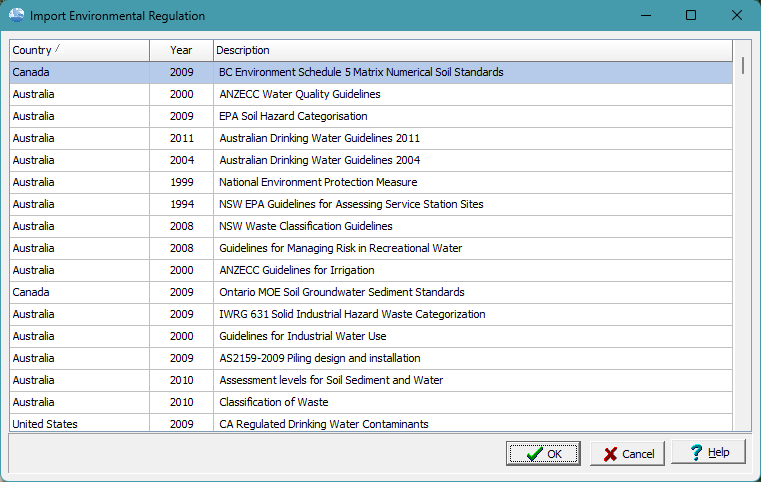
To import a regulation, select it in the list and click on the OK button. The importing of a regulation may take several minutes. The regulation will then be available when comparing laboratory analysis results in EDMS.
Summary
Expanding your Environmental Data Management System library is a straightforward process. By utilizing the import function, you ensure your project stays compliant with the most current regulatory programs. This flexibility allows for the seamless transition from general federal standards to highly specific, local-level cleanup criteria.
If the regulation you require is not provided with the program, please contact GAEA at sales@gaeatech.com and we will do our best to provide an import file with the regulation