

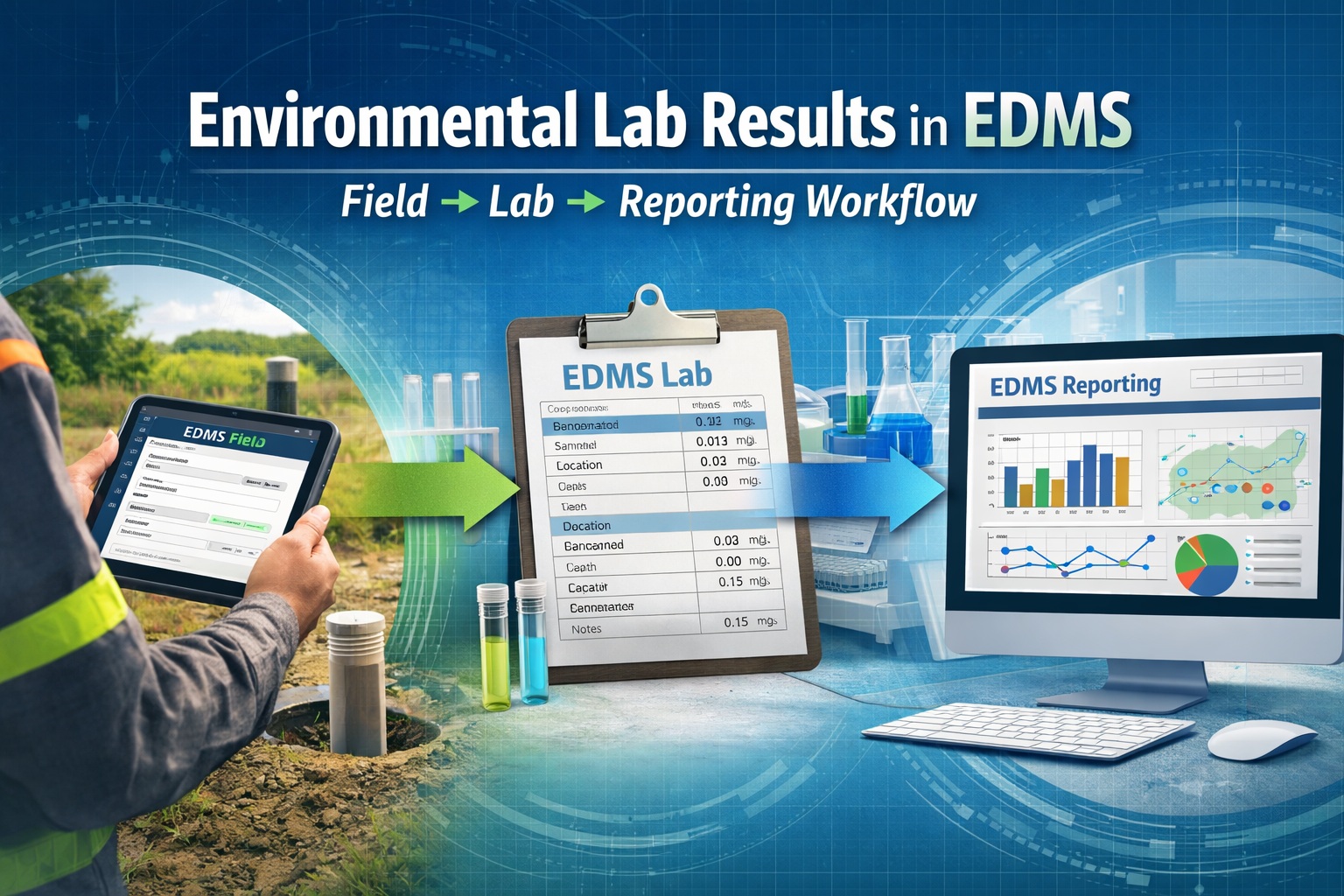
Environmental laboratory data is central to nearly every geotechnical and environmental project—from contaminated site assessments to long-term groundwater monitoring. However, managing this data efficiently requires more than spreadsheets and disconnected reports.
Environmental Data Management System (EDMS) provides a unified platform to collect, validate, store, and report laboratory results. When combined with tools like EDMS Field for data collection and EDMS Lab for laboratory integration, organizations can eliminate manual workflows and significantly improve accuracy.
EDMS is used to improve and standardize environmental data collection, management, and reporting in an efficient and cost-effective manner. This is accomplished by implementing a documented, auditable process for the collection, storage, and reporting of environmental field data. Throughout this process all stages of the sampling and analysis are tracked and notifications can be sent via email or SMS (text message). Notifications for non-compliance events and sample exceedences can be automatically sent by the system.
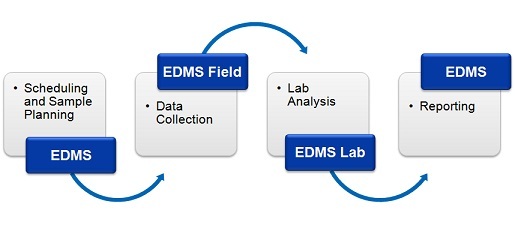
This process can be divided into four stages:.
- Scheduling and Sample Planning
The first stage in any environmental field program is the scheduling and planning of sampling events. EDMS allows project managers to design, delegate, and monitor sampling events. Sampling events can be either singular or re-occurring. Prior to data collection, sampling stations can be specified. These sample stations include information on station location and construction, sampling defaults and methodology, lab analyses required, required equipment and personnel. Sample labels with barcodes and a Chain of Custody (COC) can be printed from the stations to be used in data collection and lab submittal.
- Data Collection
When a sampling event occurs all of the station information is inherited by the sample including sampling defaults, required lab analyses, and personnel. Detailed sample information can be recorded for each environmental media on a Windows laptop or tablet using EDMS Field or a field notebook (for later data entry). Sample photographs can also be included with the sample data. Sample data collected using EDMS Field can be uploaded to the main database remotely as an Electronic Data Interchange (EDI) file. The remote uploading of data using an EDI file provides for faster more comprehensive data reporting and reduces the possibility of transcription errors.
- Lab Analysis
Samples submitted for lab analysis are tracked during shipping, receiving, lab analysis, and reporting process. This tracking is reported on by EDMS and EDMS Lab (free lab reporting software provided by GAEA). Analytical labs using EDMS Lab can upload analysis results to the main database automatically as an EDI file. The electronic reporting of lab data reduces the effort and possibly of errors of manual data entry. A Certificate of Analysis (COA) can be included in the EDI file and a copy stored in the main database.
- Reporting
Sample and lab analysis results can be collated and reported on in a variety of tables and graphs. These tables and graphs can be easily customized to meet internal and external needs. In addition, EDMS data is fully integrated and available for use by other modules within GaeaSynergy. Sample and lab analysis data can be viewed and used in WinLoG, WinFence, GIS, and maps.
In this tutorial, you’ll learn a complete end-to-end workflow for entering, reporting, and storing environmental laboratory results in EDMS, including best practices and real-world applications.
Introduction to EDMS for Environmental Laboratory Data
Environmental Data Management System (EDMS) is designed to centralize all environmental and geotechnical data into a structured, queryable database.
Unlike traditional workflows that rely on:
- Excel spreadsheets
- PDF lab reports
- Manual transcription
EDMS enables:
- Real-time data capture
- Automated lab data import
- Integrated reporting
- Long-term data storage
By combining EDMS Field and EDMS Lab, organizations can create a seamless workflow from sample collection to final reporting.
Understanding the EDMS Workflow
Before diving into details, it’s important to understand how data flows through EDMS:
- Field Data Collection (EDMS Field)
- Sample Tracking and Metadata Storage
- Laboratory Data Import (EDMS Lab)
- Validation and QA/QC
- Reporting and Visualization
- Long-Term Storage and Retrieval
Each stage is interconnected, ensuring that data is entered once and used throughout the project lifecycle.
Step 1: Collecting Field Data Using EDMS Field
Field data collection is the foundation of accurate laboratory reporting.
What is EDMS Field?
EDMS Field is a mobile or tablet-based tool that allows field technicians to:
- Record borehole and monitoring well data
- Capture sample information in real time
- Assign sample IDs and depths
- Attach photos and notes
Key Features of EDMS Field
- Real-time data entry
- Offline capability for remote sites
- Standardized forms and templates
- Direct synchronization with EDMS database
Benefits of Using EDMS Field
- Eliminates handwritten notes
- Reduces transcription errors
- Ensures consistency across teams
- Speeds up data availability
Because the data is entered digitally at the source, it becomes immediately available for lab integration.
Step 2: Preparing Laboratory Data for EDMS Lab Integration
Once samples are collected and sent to the laboratory, results are returned in various formats.
Common Lab Deliverables
- PDF reports
- Excel spreadsheets
- Electronic Data Deliverables (EDD)
Step 3: Importing Laboratory Results Using EDMS Lab
What is EDMS Lab?
EDMS Lab is a specialized module designed to:
- Import laboratory results
- Map lab data to database fields
- Validate and standardize results
- Link results directly to field samples
Importing Data into EDMS Lab
EDMS Lab supports:
- Excel imports
- EDD file uploads
- Automated data mapping
Step 4: Validating Laboratory Data in EDMS
Once data is imported, validation ensures accuracy and compliance.
QA/QC Processes
Quality assurance includes:
- Reviewing flagged results
- Comparing duplicates
- Verifying control samples
Audit Trails
EDMS maintains a full audit trail:
- Who imported the data
- When changes were made
- What values were modified
This is essential for regulatory audits.
Step 5: Reporting Environmental Laboratory Results
With validated data in EDMS, reporting becomes significantly more efficient.
Automated Tables and Outputs
Instead of manually building tables in Word or Excel:
- Data is pulled directly from the database
- Tables update automatically
- Formatting is standardized
Data Visualization
EDMS supports:
- Time-series graphs
- Contaminant trend analysis
- GIS mapping
Visualization helps stakeholders quickly understand site conditions.
Real-Time Reporting Benefits
Because EDMS connects field and lab data:
- Reports can be generated immediately after lab import
- Updates are reflected instantly
- Teams can collaborate more effectively
Step 6: Storing Environmental Laboratory Results in EDMS
Proper storage ensures long-term accessibility and compliance.
Centralized Data Storage
All data is stored in a structured database:
- Field data
- Lab results
- Reports
- Metadata
Advantages of Centralized Storage
- Easy retrieval of historical data
- Consistent data structure
- Improved collaboration
Cloud-Based EDMS Systems
Modern EDMS platforms often use cloud infrastructure:
- Secure access from anywhere
- Automatic backups
- Scalable storage
Data Security and Permissions
EDMS systems include:
- Role-based access control
- Secure login systems
- Data encryption
Long-Term Data Management
Environmental projects often require data retention for decades.
EDMS supports:
- Archiving
- Version control
- Data migration
Step 7: Integrating Lab Data with the Full Project Lifecycle
One of the biggest advantages of EDMS is integration.
Linking Lab Data to Field Data
Because EDMS Field and EDMS Lab are connected:
- Every lab result links to a physical sample
- Data can be visualized spatially
- Errors from mismatched records are eliminated
Supporting Decision-Making
Lab data informs:
- Risk assessments
- Remediation strategies
- Regulatory compliance
Cross-Project Analysis
With centralized storage, organizations can:
- Compare multiple sites
- Analyze trends over time
- Reuse historical data
Best Practices for Using EDMS Field and EDMS Lab
1. Standardize Data Entry in the Field
- Use predefined templates
- Enforce naming conventions
- Train field staff
2. Automate Lab Data Imports
- Use EDMS Lab mapping tools
- Avoid manual entry whenever possible
3. Validate Data Immediately
- Run QA/QC checks after import
- Address errors early
4. Use Templates for Reporting
- Standardize outputs
- Ensure consistency across projects
5. Maintain Data Integrity
- Use audit trails
- Control user permissions
Future Trends in EDMS and Laboratory Data Management
AI-Powered Data Extraction
Automatically convert lab PDFs into structured data.
Real-Time Field-to-Lab Integration
Instant synchronization between EDMS Field and EDMS Lab.
Advanced Analytics
Predictive modeling and contamination forecasting.
Cloud Collaboration
Teams working seamlessly across locations.
Conclusion
Managing environmental laboratory results doesn’t have to be complex or error-prone. By using a modern Environmental Data Management System (EDMS) with integrated tools like EDMS Field and EDMS Lab, organizations can:
- Streamline data entry
- Automate lab integration
- Improve reporting accuracy
- Ensure long-term data integrity
Instead of juggling spreadsheets and disconnected reports, EDMS provides a unified workflow that connects field data, laboratory results, and reporting into a single, efficient system.
By following the workflow outlined in this guide, you can significantly improve your environmental data management processes—saving time, reducing errors, and delivering higher-quality results.