

Best Practices for Moving Geological Data from Legacy Systems to Modern Databases
Data migration is one of the most critical—and often riskiest—activities in geological and geotechnical data management. Organizations routinely migrate borehole records from legacy databases, spreadsheets, paper archives, proprietary software systems, and aging data repositories into modern geological database platforms. While the goal is usually to improve accessibility, reporting, validation, and long-term data management, poorly planned migrations can result in lost information, corrupted records, broken relationships, and costly rework.
For organizations managing decades of geological, geotechnical, hydrogeological, environmental, or mining data, migration projects often involve thousands of boreholes, hundreds of thousands of intervals, laboratory results, groundwater records, and historical reports. Even small migration errors can affect engineering decisions, regulatory compliance, environmental investigations, and future project planning.
The good news is that most migration-related data loss can be prevented through structured planning, data standardization, spreadsheet cleanup, and comprehensive validation procedures.
This article explores best practices for preventing data loss during borehole data migration, focusing on legacy systems, spreadsheet cleanup, standardization, and validation workflows.
Why Borehole Data Migrations Fail
Many organizations underestimate the complexity of geological data migration.
Migration projects often involve:
- Multiple data sources
- Different software platforms
- Inconsistent coding systems
- Missing metadata
- Historical records
- Varying data quality standards
When these issues are not addressed before migration, data loss becomes much more likely.
Common migration failures include:
- Missing boreholes
- Lost laboratory results
- Incorrect coordinates
- Broken interval relationships
- Truncated text fields
- Duplicate records
- Missing attachments
- Corrupted groundwater records
In many cases, these problems are not discovered until long after the migration is complete.
Understanding Legacy Systems
Most geological organizations possess valuable information stored in legacy systems.
Examples include:
- Older geological databases
- DOS-based applications
- Custom-built software
- Microsoft Access databases
- Spreadsheets
- Paper borehole logs
- Archived laboratory systems
While these systems may still contain valuable information, they often present challenges for modern migration projects.
Common Legacy Data Issues
Legacy databases frequently contain:
- Obsolete coding standards
- Inconsistent field definitions
- Unsupported formats
- Missing documentation
- Duplicate records
- Incomplete metadata
For example:
One system may store lithology as:
| Code |
|---|
| CL |
| SA |
| GR |
Another may use:
| Description |
| Clay |
| Sand |
| Gravel |
Without proper mapping, important information can be lost during migration.
Document the Source System
Before any migration begins, organizations should fully document:
- Database structure
- Field definitions
- Relationships
- Coding systems
- Data volumes
This documentation becomes essential when verifying migrated data later.
Inventory All Data Sources
One of the most common causes of migration-related data loss is incomplete source identification.
Organizations often focus on the primary database while overlooking secondary data sources.
Examples include:
- Spreadsheets
- Laboratory exports
- GIS systems
- Monitoring databases
- Core photography archives
- PDF reports
- Survey files
A comprehensive inventory should identify:
- Data source location
- Data owner
- Data format
- Record count
- Relationship to other datasets
Without a complete inventory, important information may never be migrated.
Spreadsheet Cleanup
Spreadsheets are among the most common sources of migration problems.
Many organizations have accumulated years of borehole information stored in Excel files created by multiple users.
While spreadsheets are flexible, they often contain inconsistencies that must be addressed before migration.
Common Spreadsheet Problems
Examples include:
- Duplicate records
- Missing fields
- Inconsistent codes
- Mixed units
- Formatting issues
- Hidden rows
- Embedded formulas
- Merged cells
These issues can interfere with automated imports.
Standardize Units
Migration projects should verify that units are consistent.
Examples:
| Parameter | Unit |
| Depth | metres |
| Elevation | metres |
| Recovery | percent |
Mixing units can create significant errors after migration.
Remove Duplicate Records
Duplicate records frequently occur when multiple spreadsheet versions exist.
Before migration:
- Identify duplicates
- Verify correct records
- Remove obsolete versions
This prevents unnecessary confusion and database inflation.
Data Standardization
Standardization is one of the most effective ways to reduce migration risk.
Without standardization, identical information may appear in many different forms.
Example: Lithology Descriptions
Consider the following entries:
- Clay
- CLAY
- clay
- Silty Clay
- Clay, Silty
- Firm Clay
All may represent similar materials.
Standardization ensures that equivalent values are stored consistently.
Controlled Vocabularies
Organizations should establish:
- Standard lithology codes
- Laboratory test codes
- Sampling method codes
- Groundwater observation codes
Controlled vocabularies improve consistency and simplify validation.
Standardize Coordinate Systems
Coordinate-related errors are among the most serious migration problems.
Organizations should verify:
- Coordinate system
- Projection
- Datum
- Elevation reference
Failure to standardize spatial information can result in boreholes appearing in incorrect locations.
Data Mapping
Data mapping defines how information from the source system will be stored in the target database.
Every source field should have a documented destination.
Mapping Example
| Source Field | Target Field |
| BH_NO | BoreholeID |
| DEPTH_M | FinalDepth |
| NORTHING | YCoordinate |
| EASTING | XCoordinate |
Clear mapping documentation helps ensure that information is transferred accurately.
Relationship Mapping
Migration projects must also preserve relationships.
Examples include:
- Boreholes to lithology intervals
- Boreholes to samples
- Samples to laboratory tests
- Wells to groundwater readings
Broken relationships can significantly reduce data value.
Validation Procedures
Validation is the most important step in preventing data loss.
Migration should never be considered complete until validation has been performed.
Pre-Migration Validation
Before migration begins:
Verify:
- Record counts
- Field completeness
- Coordinate quality
- Duplicate records
- Mandatory fields
This establishes a baseline for comparison.
Post-Migration Validation
After migration:
Compare migrated data against source records.
Examples:
| Dataset | Source | Target |
| Boreholes | 5,000 | 5,000 |
| Samples | 120,000 | 120,000 |
| Lab Tests | 450,000 | 450,000 |
Differences should be investigated immediately.
Automated Validation Rules
Modern geological databases often support automated validation checks.
Examples include:
Borehole Validation
- Duplicate IDs
- Missing coordinates
- Invalid elevations
Lithology Validation
- Overlapping intervals
- Missing descriptions
- Invalid codes
Sampling Validation
- Depth conflicts
- Duplicate sample numbers
Groundwater Validation
- Invalid dates
- Water level anomalies
Automated validation significantly improves migration reliability.
Use a Staging Environment
One of the best practices for migration projects is using a staging environment.
A staging database allows organizations to:
- Import data safely
- Perform validation
- Resolve issues
- Test reports
before data enters production.
This approach reduces risk and improves quality.
QA/QC Review Workflows
Validation alone is not enough.
Technical review remains essential.
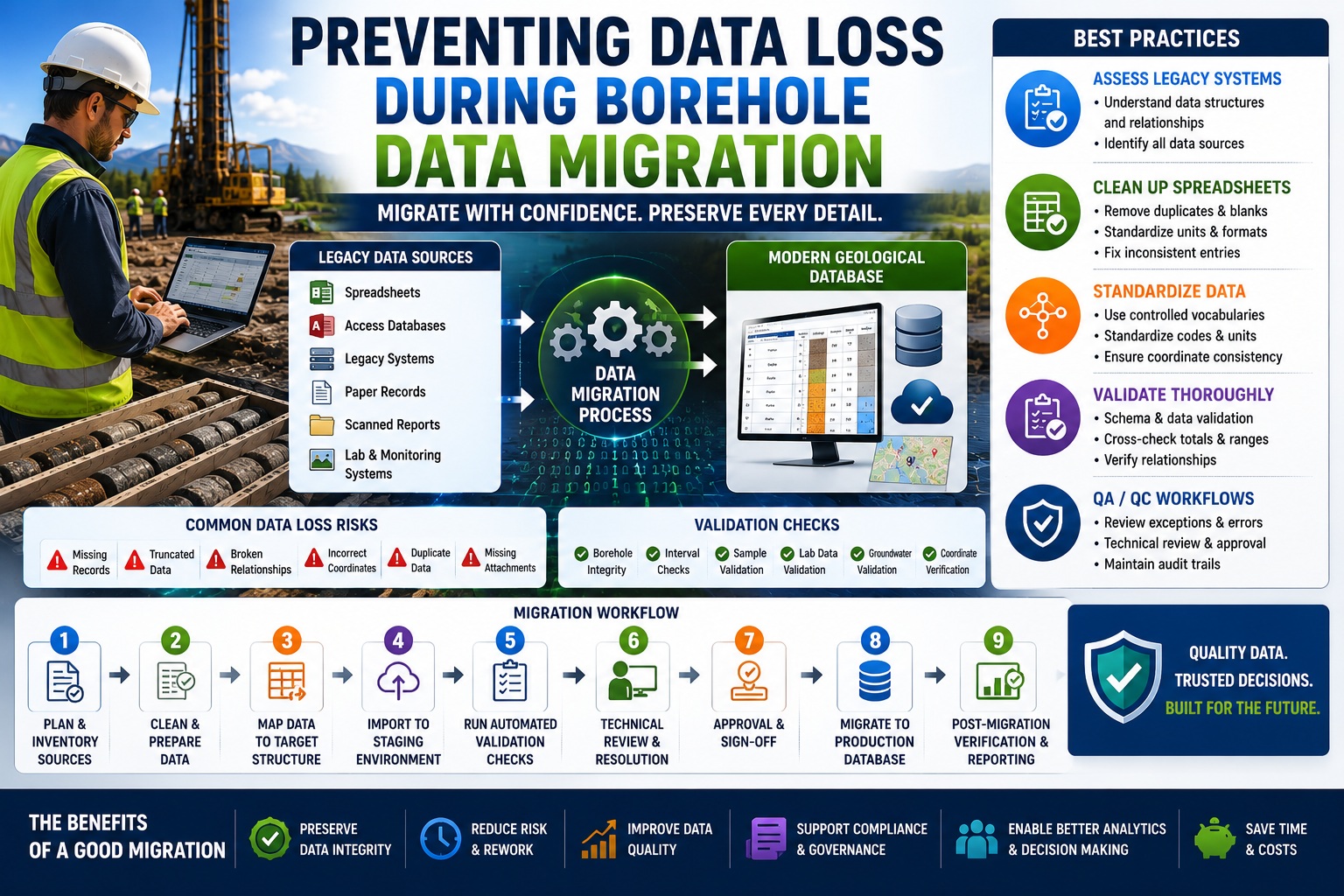
A recommended workflow includes:
Step 1
Extract data from source systems.
Step 2
Perform spreadsheet cleanup.
Step 3
Standardize data.
Step 4
Import into staging database.
Step 5
Run automated validation.
Step 6
Conduct technical review.
Step 7
Approve migration results.
Step 8
Move data into production.
This process combines automation with expert oversight.
Audit Trails and Migration Documentation
Migration projects should be fully documented.
Organizations should record:
- Source systems
- Mapping rules
- Validation results
- Error corrections
- Review approvals
This documentation provides accountability and supports future audits.
Why Audit Trails Matter
Years after migration, users may ask:
- Where did this data originate?
- Was it modified?
- Were errors corrected?
- Was validation completed?
Audit trails provide the answers.
Common Data Loss Risks
Several recurring issues contribute to migration failures.
Examples include:
Truncated Text
Long descriptions may exceed target field lengths.
Missing Attachments
Core photos, reports, and PDFs may not be migrated.
Orphaned Records
Laboratory results lose links to samples.
Coordinate Conversion Errors
Incorrect projections move boreholes to invalid locations.
Unmapped Fields
Information exists in the source system but has no destination.
Each of these risks should be addressed during planning.
Future-Proofing Your Geological Database
A migration project is an opportunity to improve data quality.
Organizations should use migrations to:
- Standardize coding systems
- Implement validation rules
- Improve metadata management
- Establish QA workflows
- Support AGS and DIGGS standards
- Prepare for AI and analytics initiatives
A successful migration does more than move data—it creates a stronger foundation for future projects.
Conclusion
Preventing data loss during borehole data migration requires much more than transferring records from one system to another. Successful migrations begin with understanding legacy systems, inventorying all data sources, cleaning spreadsheets, standardizing information, documenting mapping rules, and performing rigorous validation. By combining automated QA/QC procedures with technical review and audit-ready documentation, organizations can significantly reduce migration risk while improving data quality and long-term usability. As geological databases continue to evolve, well-planned migration strategies will play a critical role in preserving valuable subsurface information and ensuring that decades of knowledge remain accessible, accurate, and ready for future use.