

Introduction
Geological maps are foundational tools in geoscience, providing critical insights into lithology, structural features, stratigraphy, and surface expressions of subsurface conditions. For decades, these maps were created as paper documents—carefully drafted, annotated, and archived by geologists in government surveys, oil and gas companies, mining firms, and environmental consultancies.
Today, vast collections of these maps exist in analog formats, often stored in archives and rarely used to their full potential. As the geoscience industry moves toward digital workflows, GIS integration, and advanced subsurface modeling, the need to digitize geological maps has become increasingly important.
Digitizing geological maps transforms static paper documents into dynamic, spatially referenced datasets that can be analyzed, visualized, and integrated with other geoscientific data. This article explores the methods, workflows, challenges, and best practices for digitizing geological maps for GIS and subsurface modeling, helping organizations unlock the full value of their legacy data.
The Importance of Geological Map Digitization
Geological maps contain a wealth of information that supports a wide range of applications.
Key information captured in geological maps
- Rock types and lithology
- Structural features such as faults and folds
- Stratigraphic boundaries
- Surface expressions of subsurface geology
- Geomorphological features
When digitized, these maps become powerful tools for:
GIS-based spatial analysis
Digital maps can be integrated into GIS platforms to support spatial queries, overlays, and modeling.
Subsurface modeling
Digitized surface geology provides essential constraints for building 3D geological models.
Resource exploration
Geological maps guide exploration for hydrocarbons, minerals, and groundwater.
Environmental and engineering applications
They support site assessments, hazard analysis, and infrastructure planning.
Digitization enables these datasets to be searchable, shareable, and interoperable.
Challenges of Working With Analog Geological Maps
Despite their value, analog geological maps present several challenges.
Physical degradation
Over time, maps may suffer from:
- Fading ink
- Paper deterioration
- Tears and folds
- Color distortion
Lack of georeferencing
Paper maps are not inherently tied to coordinate systems, making spatial analysis difficult.
Limited accessibility
Maps stored in archives are difficult to access and share.
Inconsistent formats
Historical maps may use different symbols, scales, and projections.
Digitization addresses these challenges by converting maps into standardized digital formats.
Overview of the Digitization Workflow
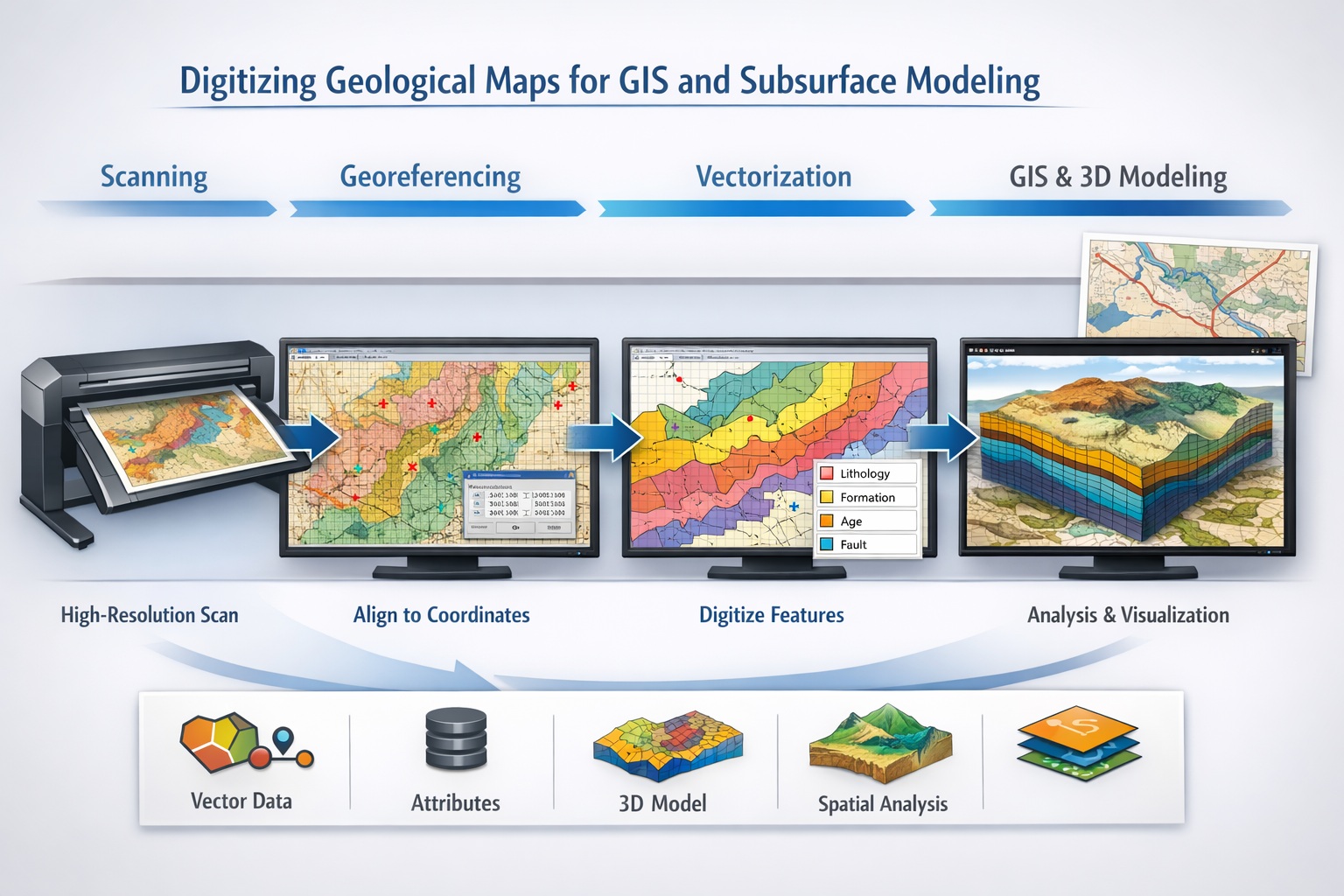
Digitizing geological maps involves several stages:
- Map preparation
- High-resolution scanning
- Image preprocessing
- Georeferencing
- Vectorization and digitization
- Attribute assignment
- Quality control and validation
- Integration into GIS and modeling systems
Each stage plays a critical role in ensuring data accuracy and usability.
Step 1: Map Preparation
Before scanning, maps must be carefully prepared.
Preparation tasks include:
- Flattening folded maps
- Cleaning dust and debris
- Repairing tears where possible
- Identifying map scale and projection
Technicians should also document metadata such as:
- Map title
- Author or organization
- Publication date
- Coordinate system (if available)
This information is essential for later stages of digitization.
Step 2: High-Resolution Scanning
Scanning converts the physical map into a digital image.
Recommended scanning parameters:
- Resolution: 300–600 DPI
- Format: TIFF (lossless)
- Color mode: Full color for maps with complex symbology
High-resolution scanning ensures that fine details such as linework and labels are preserved.
After scanning, images should be reviewed for:
- Distortion or skew
- Missing edges
- Blurring or artifacts
Step 3: Image Preprocessing
Scanned images often require enhancement before digitization.
Common preprocessing techniques:
- Deskewing and alignment
- Contrast and brightness adjustment
- Color correction
- Noise reduction
These steps improve the clarity of map features and facilitate accurate digitization.
Step 4: Georeferencing
Georeferencing is one of the most critical steps in map digitization.
It involves aligning the scanned map with real-world coordinates.
Process:
- Identify control points (e.g., intersections, landmarks, grid lines)
- Match these points to known coordinates
- Apply transformation (e.g., affine or polynomial)
- Validate spatial accuracy
Tools:
- ArcGIS
- QGIS
- Global Mapper
Accurate georeferencing ensures that the map aligns correctly with other spatial datasets.
Step 5: Vectorization and Feature Digitization
Once georeferenced, map features are converted into vector data.
Types of features digitized:
- Polygons (lithological units)
- Lines (faults, contacts, boundaries)
- Points (sample locations, wells, outcrops)
Digitization methods:
Manual digitization
Technicians trace features using GIS software.
Semi-automated digitization
Software assists with line detection and feature extraction.
Automated digitization
AI-based tools identify and digitize features.
Manual digitization is often preferred for complex geological maps due to higher accuracy.
Step 6: Attribute Assignment
Digitized features must be enriched with attribute data.
Examples:
- Lithology type
- Formation name
- Age
- Structural classification
Attributes allow for:
- Querying and filtering data
- Thematic mapping
- Integration with geological models
Proper attribute assignment is essential for meaningful analysis.
Step 7: Quality Control and Validation
Quality control ensures the accuracy and reliability of digitized maps.
QC checks include:
- Spatial accuracy verification
- Topological consistency (no gaps or overlaps)
- Attribute validation
- Visual comparison with original map
Common errors:
- Misaligned features
- Incorrect boundaries
- Missing attributes
Combining automated checks with expert review ensures high-quality results.
Step 8: Integration With GIS Systems
Digitized maps are integrated into GIS platforms for analysis.
Common GIS applications:
- Overlay analysis
- Spatial querying
- Map visualization
- Data sharing
Popular GIS software:
- ArcGIS
- QGIS
- MapInfo
Integration enables users to combine geological data with other datasets such as:
- topography
- satellite imagery
- infrastructure
Role in Subsurface Modeling
Digitized geological maps play a critical role in subsurface modeling.
Applications include:
- Building 3D geological models
- Defining stratigraphic boundaries
- Constraining structural frameworks
- Supporting reservoir modeling
Surface geology provides essential input for understanding subsurface conditions.
Advanced Techniques in Map Digitization
Modern technologies are enhancing geological map digitization.
Machine learning and AI
- Automated feature recognition
- Classification of lithologies
- Pattern detection
Computer vision
- Line and boundary detection
- Symbol recognition
Cloud-based workflows
- Collaborative digitization
- Centralized data storage
These technologies improve efficiency and scalability.
Common Challenges and Solutions
Challenge: Complex symbology
Solution: Use expert interpretation and standardized legends.
Challenge: Poor map condition
Solution: Apply image enhancement and restoration techniques.
Challenge: Missing metadata
Solution: Cross-reference with external sources.
Challenge: Georeferencing inaccuracies
Solution: Use multiple control points and validate results.
Benefits of Digitizing Geological Maps
Digitization offers significant advantages:
Data preservation
Protects maps from physical degradation.
Improved accessibility
Enables digital storage and sharing.
Enhanced analysis
Supports GIS and modeling workflows.
Cost savings
Reduces need for field remapping.
Integration with modern technologies
Enables AI, machine learning, and advanced analytics.
Best Practices for Geological Map Digitization
To ensure success:
- Use high-resolution scanning
- Maintain original data integrity
- Apply accurate georeferencing
- Use consistent digitization standards
- Perform rigorous quality control
- Document metadata thoroughly
These practices ensure reliable and usable datasets.
Future Trends
The future of geological map digitization includes:
AI-driven automation
Reducing manual effort.
Real-time GIS integration
Seamless data workflows.
3D and 4D modeling integration
Linking surface and subsurface data.
Digital twins
Combining geological data with real-time systems.
These advancements will further enhance the value of geological maps.
Conclusion
Digitizing geological maps is a critical step in modernizing geoscience workflows. By converting analog maps into digital, georeferenced datasets, organizations can unlock valuable geological information and integrate it into GIS and subsurface modeling systems.
The process involves careful preparation, high-resolution scanning, georeferencing, digitization, and rigorous quality control. While challenges exist, the benefits—improved accessibility, enhanced analysis, and data preservation—make digitization an essential investment.
As technology continues to evolve, digitized geological maps will play an increasingly important role in exploration, environmental management, and infrastructure development.
Learn more about our Data Solutions
- Geophysical and well log digitization
- Seismic section digitization
- Map digitization
- Core photo splicing
- Scout ticket digitization
Related Articles
- Data Digitization and Management Solutions for Geoscience and Engineering
- Transforming Legacy Geological Archives into Structured Digital Databases
- 5 Steps To Convert Your Archive Into An AI-Ready Geospatial Pipeline
- Beyond The Archive: Why Map Digitization Is The Foundation Of Your 2026 Digital Twin
- Mastering Map Digitization: A Comprehensive Guide to Meeting ESG Reporting Requirements
- Data Formats For Digitized Maps Explained