

Managing environmental and geotechnical projects can quickly become overwhelming—especially when data is scattered across spreadsheets, reports, and disconnected tools.
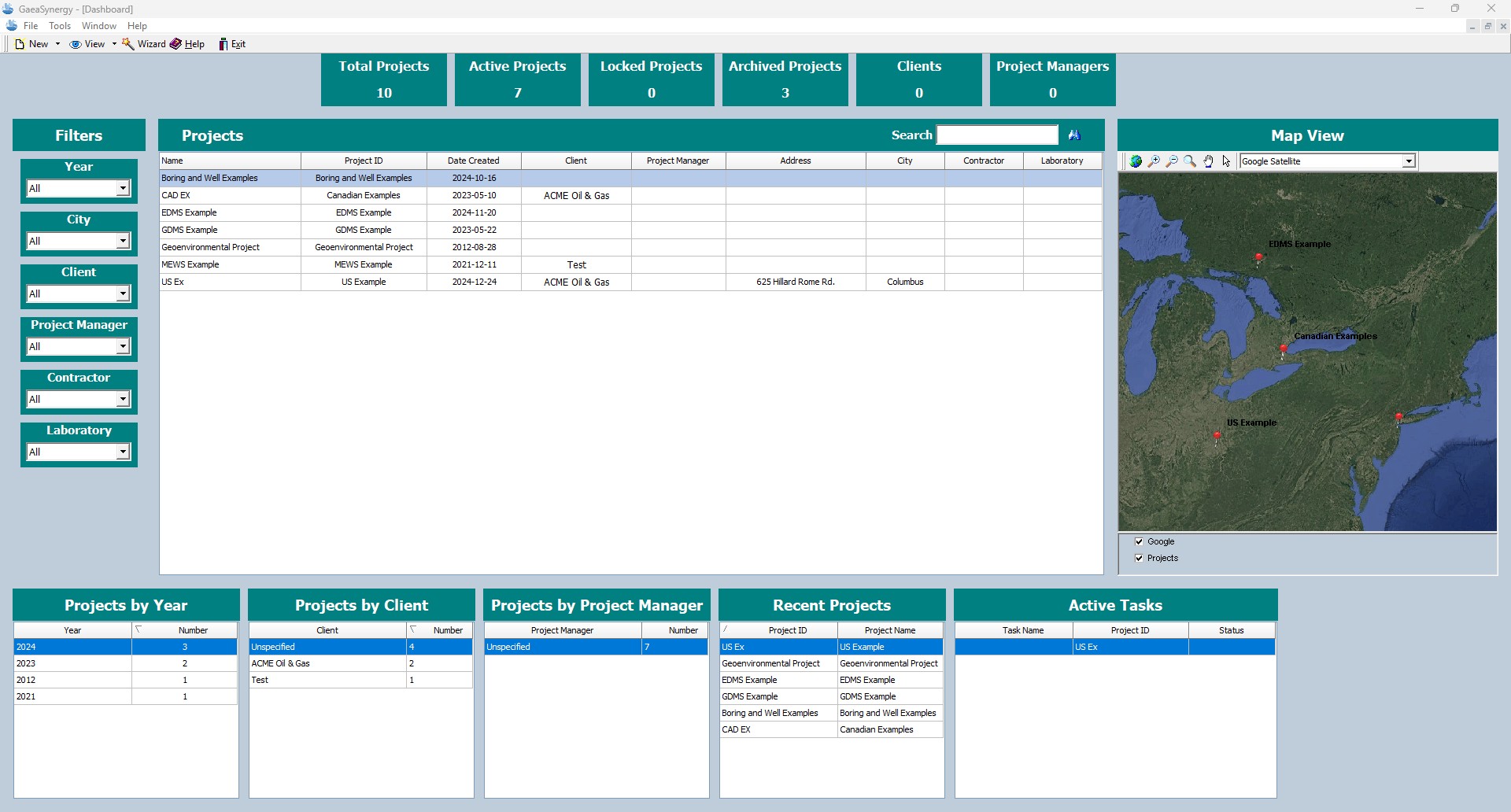
The new GaeaSynergy dashboard solves this problem by bringing everything into one powerful, intuitive interface. Designed for efficiency, clarity, and real-time decision-making, this upgraded dashboard gives you complete control over your projects at a glance.
A Centralized View of All Your Projects
The new dashboard is built around a centralized project management experience, allowing users to quickly access and analyze project data without switching between multiple screens.
At the heart of the system is the Project List, which provides:
- A clean, sortable overview of all projects
- Key metadata such as client, location, and status
- Quick navigation to detailed project pages
This ensures that whether you’re managing 10 projects or 1,000, everything remains organized and accessible.
Interactive Map for Spatial Insights
Understanding where your projects are located is critical in environmental and geotechnical workflows.
The dashboard includes an interactive map view that allows you to:
- Visualize projects geographically
- Identify regional trends and clustering
- Quickly access project details by clicking map points
This spatial intelligence helps teams make better logistical and operational decisions.
Powerful Project Breakdown Views
To help you analyze your portfolio more effectively, GaeaSynergy introduces multiple categorized views:
Projects by Year
- Track project volume over time
- Identify growth trends and seasonal patterns
- Support reporting and forecasting
Projects by Client
- Quickly assess client activity
- Identify high-value or repeat clients
- Improve client relationship management
Projects by Project Manager
- Monitor workload distribution
- Evaluate team performance
- Improve resource allocation
These breakdowns transform raw data into actionable insights.
Recent Projects & Active Tasks
Stay on top of what matters most with dedicated sections for:
Recent Projects
- Instantly view newly created or updated projects
- Track ongoing activity across your organization
Active Tasks
- Monitor task progress in real time
- Identify bottlenecks early
- Ensure deadlines are met
This ensures that nothing slips through the cracks.
Advanced Filtering for Precision Control
One of the most powerful features of the new dashboard is its advanced filtering system.
Users can filter projects based on:
- Year
- City
- Client
- Project Manager
- Contractor
- Laboratory
This allows you to:
- Drill down into specific datasets
- Generate custom views instantly
- Save time when preparing reports or audits
No more manual searching—just fast, precise results.
Designed for Real-World Workflows
The GaeaSynergy dashboard isn’t just visually appealing—it’s built for how professionals actually work:
- Environmental consultants
- Geotechnical engineers
- Project managers
- Data analysts
Whether you’re reviewing historical data, managing active projects, or planning future work, the dashboard adapts to your workflow.
Benefits at a Glance
- ✅ Centralized project management
- ✅ Real-time data visibility
- ✅ Interactive mapping
- ✅ Multi-dimensional analytics
- ✅ Advanced filtering capabilities
- ✅ Improved team collaboration
Transform How You Manage Projects
The new GaeaSynergy dashboard is more than just an upgrade—it’s a complete transformation in how project data is organized, visualized, and utilized.
By combining data intelligence, usability, and flexibility, it empowers teams to work smarter, faster, and with greater confidence.
Ready to Experience the New Dashboard?
If you’re looking to streamline your project management and unlock deeper insights, the new GaeaSynergy dashboard is your solution.
Start exploring your data like never before.
👉 Click here to learn more about GaeaSynergy