

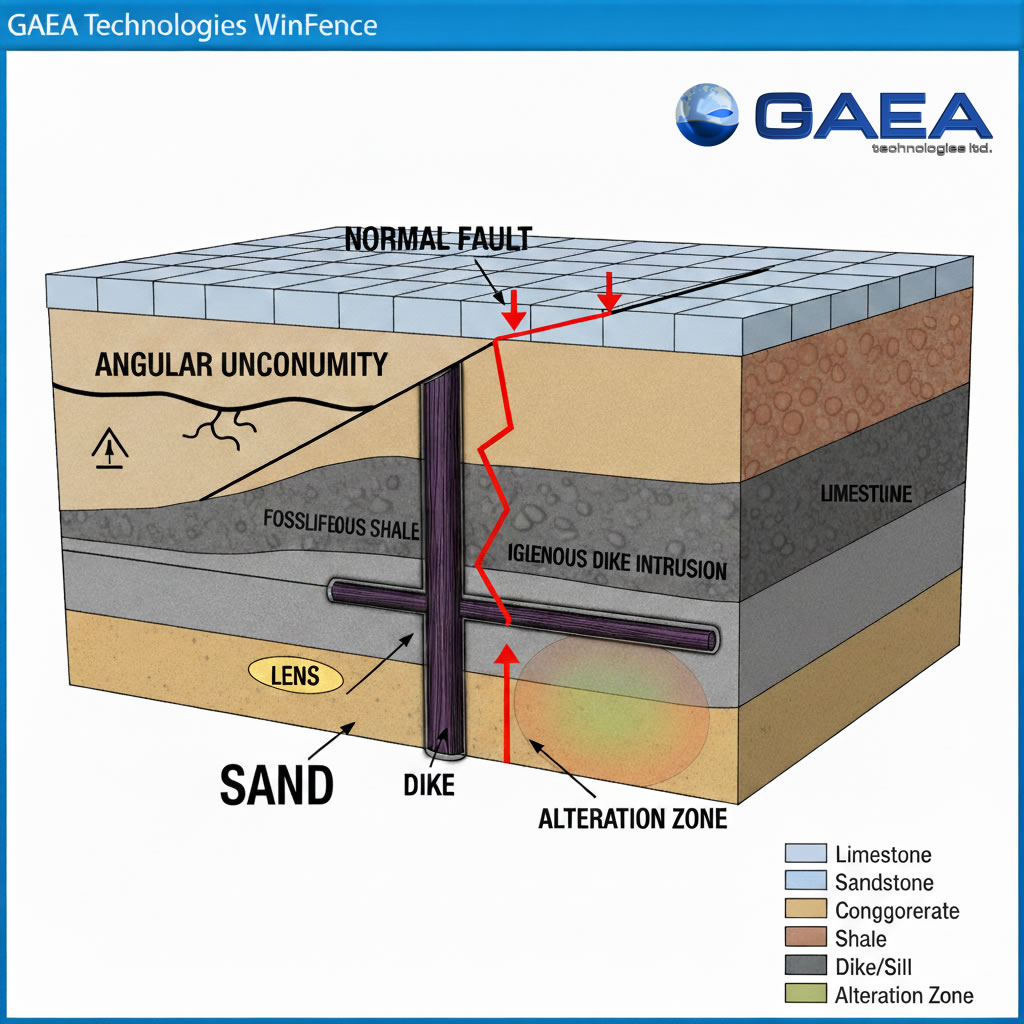
In WinFence, accurately modeling the subsurface requires more than just drawing simple lines. The software offers a wide variety of strata types specifically designed to represent complex real-world geological conditions. Understanding these types—and how their boundaries are defined—is the key to creating high-quality cross-sections.
Standard Layers
Layers are the most common strata type, used to represent continuous soil and rock units.
- Definition: They are defined by two boundaries: a top and a bottom.
- Geologic Example: A continuous bed of sandstone or a wide-reaching clay deposit.
- WinFence Use: Layers can be discontinuous or contain multiple segments, allowing you to represent complex pinch-outs or truncated beds.
Faults
Faults represent structural displacements where rock bodies have moved relative to each other.
- Definition: Unlike standard layers, faults are defined by a single boundary (a line).
- Geologic Example: A normal fault where a coal seam is vertically offset, appearing at different depths across two boreholes.
- WinFence Use: Faults act as boundaries that other strata can snap to, ensuring a clean visual break in the layers on either side of the displacement.
Unconformities
Unconformities represent a gap in the geological record due to erosion or non-deposition.
- Definition: These are handled in WinFence by creating an erosional boundary that truncates lower layers.
- Geologic Example: An angular unconformity where tilted sedimentary rock is capped by a flat-lying younger unit.
- WinFence Use: Use the Uncomformity Tool to draw the irregular erosional surface. Lower strata can then be snapped to this line to show where they “end” against the younger formation.
Intrusions
Intrusions represent bodies of rock that have forced their way into existing strata.
- Definition: Defined by a single closed boundary.
- Geologic Example: A vertical igneous dike or a horizontal sill that cuts through older limestone beds.
- WinFence Use: Use the unique snapping approach to fix the intrusion’s boundary to the edges of the strata it is penetrating, preventing gaps in your 3D model.
Lenses and Alteration Zones
Lenses are localized geological bodies, while alteration zones map areas of mineralization, contamination, or hydrocarbons.
- Definition: Both are defined by a single closed boundary.
- Geologic Example: A localized sand lens within a silty clay matrix or an oil-saturated zone within a larger reservoir.
Summary
WinFence provides a diverse set of strata types—including layers, faults, unconformities, and intrusions—to accurately represent subsurface conditions. While standard layers require two boundaries, complex features like faults and intrusions are defined by a single boundary. By utilizing the Snapping Toggle and Boundary Tool, you can create precise, professional-grade geological models that perfectly match your field data.