

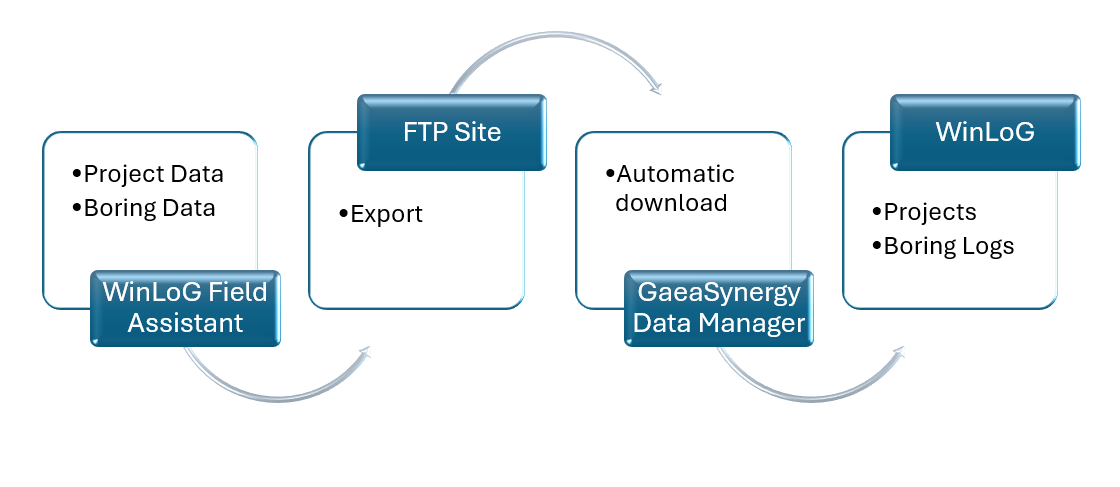
Modern geotechnical and environmental projects move fast. To keep pace, the communication between your office (WinLoG) and your field technicians (WinLoG Field Assistant) must be automated. This is achieved through Electronic Data Interchange (EDI) files and a robust Notification System that alerts stakeholders the moment data changes.
The Role of EDI in Data Exchange
EDI serves as the “universal language” for the GAEA Technologies ecosystem. Rather than sending raw database files, the system packages information into structured XML-based EDI files.
| EDI Data Type | Originator | Receiver | Purpose |
|---|---|---|---|
| Boring/Well Task Data | GaeaSynergy / WinLoG | WinLoG Field Assistant | Sends project specs and templates to the field. |
| Completed Boring Data | WinLoG Field Assistant | GaeaSynergy Data Manager | Returns logged lithology and well data to the office. |
| Sampling Task Data | GaeaSynergy | EDMS Field Extension | Sends sampling requirements to field crews. |
Automated Work Process Notifications
When using the network version of GaeaSynergy, notifications ensure that project managers don’t have to constantly check the FTP server for updates. These alerts are triggered at key milestones in the automated workflow.
Notification Triggers and Methods
Notifications are configured within Tasks and can be delivered via Email or SMS (Text Message).
- Boring/Well Required: Triggered by GaeaSynergy to alert field personnel that a new task has been assigned.
- Boring/Well Completed: Triggered by WinLoG Field Assistant once the technician uploads the final EDI file.
- Boring/Well Not Completed: Triggered by the system if a task remains open past its scheduled deadline.
The Monitoring Hub: Network Data Manager Monitor
To track these communications, administrators use the Queue Tab in the Network Data Manager Monitor. This hub provides a real-time log of:
- Event Type: Which stage of the process triggered the alert.
- Notify Date: Exactly when the personnel was alerted.
- Method: Whether the alert was sent via email or SMS.
- Personnel: The specific technician or manager who received the data.
For a broader overview see the guide: The Complete Guide to Borehole Data Solutions.