

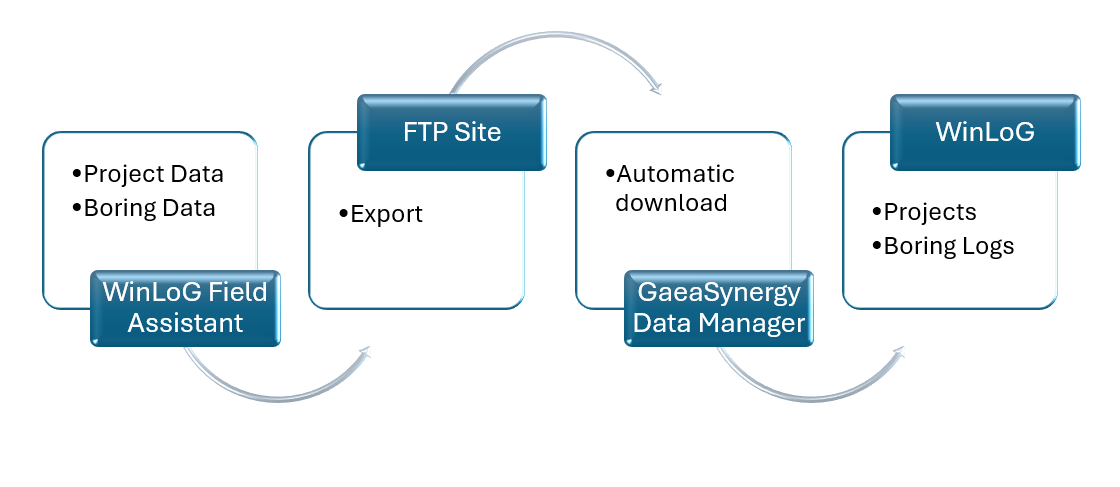
Geological and environmental fieldwork often suffers from manual transcription errors and delayed reporting. By leveraging WinLoG and WinLoG Field Assistant or WinLoG RT, teams can establish a seamless digital pipeline for boring and well data.
The Data Flow Ecosystem
The interaction between these two tools creates a robust loop of information, ensuring field data is captured accurately and integrated into the main database without manual re-entry.
1. Pre-Field Planning: Project managers use GaeaSynergy or WinLoG to design and delegate boring events.
2. Project Deployment: Field crews download project details (including proposed boring locations and custom lithology templates) from an FTP site directly onto their Android tablets.
3. Real-Time Collection: Using WinLoG Field Assistant or WinLoG RT, technicians record lithology, well construction, and sampling data on-site.
4. Automated Syncing: Collected data is exported as an Electronic Data Interchange (EDI) file and uploaded to the FTP site.
5. Database Integration: The GaeaSynergy Data Manager service automatically downloads these EDI files and merges the field data into the central server database.
Benefits of the Digital Workflow
Expanding the digital bridge between WinLoG and the Field Assistant does more than just move files; it fundamentally transforms project economics. Here are the core benefits:
1. Zero-Error Transcription: The primary “budget killer” in geological reporting is manual data entry. By using EDI file transfers, you eliminate the risk of a geologist misreading a field technician’s handwriting. The data captured at the borehole is the exact data that appears on the final log.
2. Immediate Data Availability: Traditionally, office staff wait days for field books to return from the site. With the GaeaSynergy Data Manager polling your FTP server every 15 minutes, the office can begin cross-section modeling or contouring while the field crew is still on-site.
3. Standardization : WinLoG allows you to push standardized lithology libraries and company-branded templates to every tablet. This ensures that every technician uses the same terminology and descriptions, regardless of their experience level, creating a cohesive corporate database.
4. Photographic Integration: The Field Assistant allows technicians to attach photos of core samples or site conditions directly to the borehole record. These images travel within the data flow and are automatically linked to the correct depth intervals in the WinLoG database.
5. Cost Reduction
- Reduced Office Hours: Geologists spend less time “cleaning” data and more time analyzing it.
- Reduced Travel: Real-time data review allows office-based seniors to catch errors or suggest deeper drilling while the rig is still mobilized, avoiding expensive remobilization costs.
For a broader overview see the guide: The Complete Guide to Borehole Data Solutions.