

Implementing new software is one of the most impactful—but also risky—decisions an organization can make. Whether you’re adopting a data management system, reporting platform, or workflow automation tool, the stakes are high: productivity, data integrity, and team adoption all hang in the balance.
That’s why successful organizations don’t jump straight into full deployment. Instead, they run a software pilot project.
A well-executed pilot allows you to test functionality, validate workflows, measure ROI, and identify issues—before committing to a full rollout.
This guide walks you through how to plan, execute, and evaluate a successful software pilot project, with practical strategies you can apply immediately.
What Is a Software Pilot Project?
A software pilot project is a small-scale, controlled implementation of a system within a limited scope of users, projects, or workflows.
Instead of rolling software out company-wide, a pilot allows you to:
- Test real-world performance
- Validate business processes
- Identify technical issues
- Gather user feedback
Think of it as a “trial run” that reduces risk and improves decision-making.
Why Are Software Pilot Projects Important?
1. Reduce Implementation Risk
Full-scale rollouts can fail due to:
- Poor user adoption
- Integration issues
- Workflow mismatches
A pilot helps uncover these issues early.
2. Validate Business Value
A pilot allows you to answer critical questions:
- Does the software actually improve efficiency?
- Does it integrate with existing systems?
- Does it meet user expectations?
3. Improve User Adoption
Users are more likely to adopt software when:
- They are involved early
- Their feedback is incorporated
4. Build Internal Buy-In
Successful pilots provide:
- Measurable results
- Real-world examples
This helps justify investment and secure leadership support.
What Are the Key Phases of a Software Pilot Project?
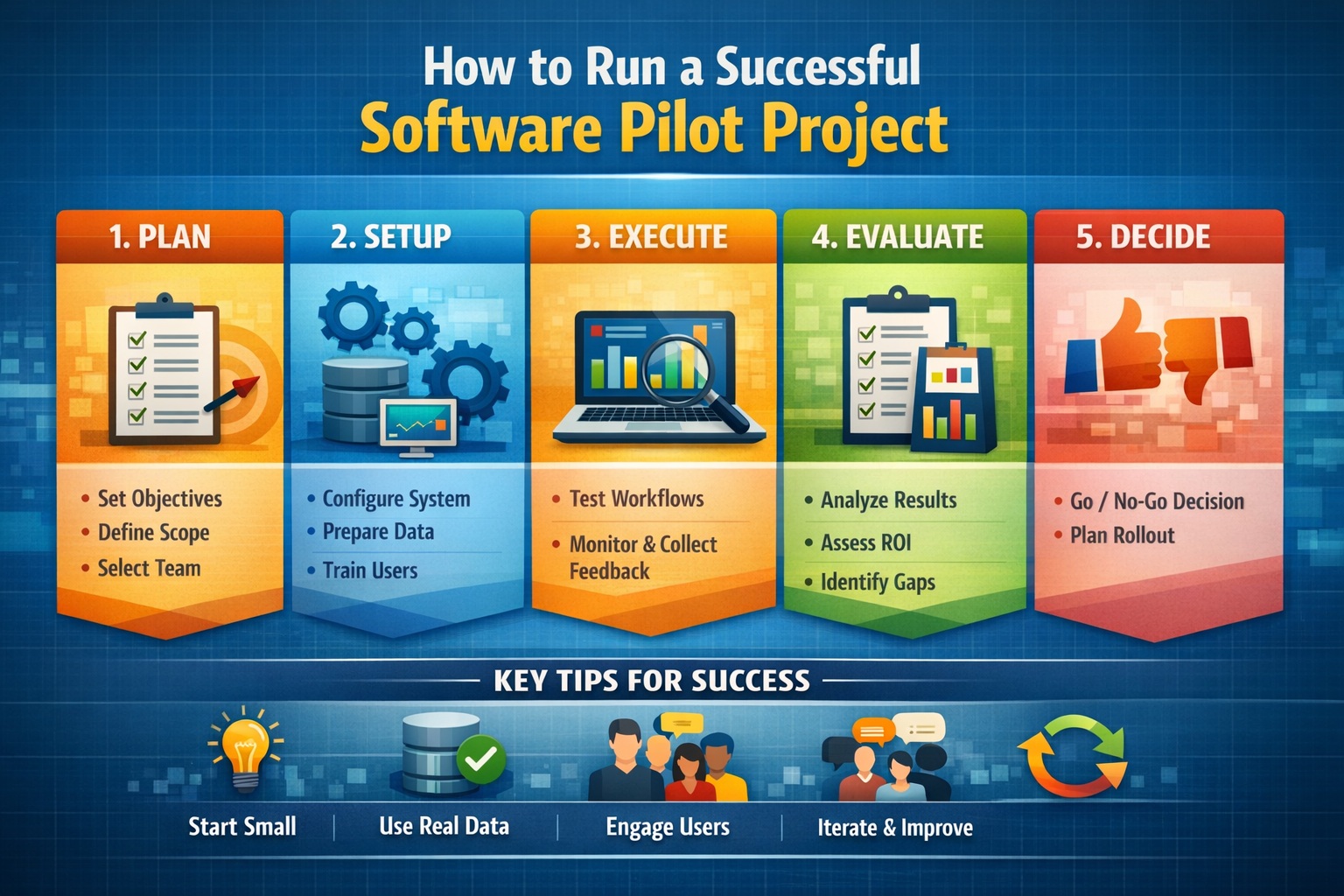
A successful pilot typically follows five phases:
- Planning
- Setup
- Execution
- Evaluation
- Rollout Decision
Let’s explore each in detail.
Phase 1: Planning Your Pilot Project
Define Clear Objectives
Start by identifying what success looks like.
Examples:
- Reduce reporting time by 50%
- Improve data accuracy
- Eliminate duplicate data entry
Avoid vague goals—define measurable outcomes.
Identify Use Cases
Select specific workflows to test.
For example:
- Environmental reporting
- Data management
- Field data collection
Focus on high-impact, repeatable processes.
Select the Pilot Team
Choose a small group of users who:
- Represent different roles
- Are open to change
- Provide constructive feedback
Include:
- Technical users
- End users
- Project managers
Define Scope
Limit the pilot to:
- A specific project
- A department
- A workflow
Avoid trying to test everything at once.
Establish Success Metrics
Define KPIs such as:
- Time savings
- Error reduction
- User satisfaction
- Adoption rate
Phase 2: Setting Up the Pilot
Configure the Software
Set up the system to match your workflows:
- Configure templates
- Define data structures
- Set user permissions
Integrate Existing Systems
Ensure compatibility with:
- Databases
- Laboratory systems
- Reporting tools
Prepare Data
Import or create test datasets:
- Real project data is ideal
- Ensure data is clean and structured
Train Users
Provide targeted training:
- Focus on pilot workflows
- Keep sessions practical
Establish Support Channels
Ensure users have access to:
- Documentation
- Technical support
- A feedback mechanism
Phase 3: Executing the Pilot
Start with Real Workflows
Use the software on actual projects, not just test scenarios.
Monitor Usage
Track how users interact with the system:
- Frequency of use
- Features utilized
- Issues encountered
Collect Feedback
Gather input through:
- Surveys
- Interviews
- Regular check-ins
Track Performance Metrics
Measure against your KPIs:
- Time to complete tasks
- Error rates
- Output quality
Address Issues Quickly
Respond to problems in real time:
- Fix configuration issues
- Provide additional training
Phase 4: Evaluating the Pilot
Analyze Results
Compare outcomes against your success metrics.
Questions to ask:
- Did the software meet expectations?
- Were efficiency gains achieved?
- Were errors reduced?
Evaluate User Feedback
Look for patterns:
- Common pain points
- Frequently requested features
Assess ROI
Calculate:
- Time savings
- Cost reductions
- Productivity improvements
Identify Gaps
Determine what needs improvement before full rollout:
- Additional training
- Workflow adjustments
- System configuration
Phase 5: Making the Rollout Decision
Go / No-Go Decision
Based on pilot results, decide:
- Proceed with full implementation
- Adjust and re-test
- Reject the solution
Develop Rollout Plan
If proceeding:
- Expand to additional teams
- Schedule training
- Plan data migration
Communicate Results
Share pilot outcomes with stakeholders:
- Highlight successes
- Address concerns
What Are Common Challenges in Software Pilot Projects?
1. Poor Planning
Lack of clear objectives leads to unclear results.
2. Overly Broad Scope
Trying to test everything reduces focus and effectiveness.
3. Lack of User Engagement
If users are not involved, feedback is limited.
4. Insufficient Training
Users struggle to adopt software without proper training.
5. Ignoring Feedback
Failure to act on feedback reduces trust and adoption.
What Are Best Practices for a Successful Pilot?
Start Small, Think Big
Focus on a manageable scope while planning for scalability.
Use Real Data
Testing with real data provides more accurate insights.
Involve Stakeholders Early
Engage decision-makers and end users from the beginning.
Communicate Frequently
Keep everyone informed about:
- Progress
- Issues
- Results
Iterate and Improve
Use pilot findings to refine workflows and configurations.
How Long Should a Pilot Project Last?
Typical duration:
- Small pilots: 2–4 weeks
- Medium pilots: 1–2 months
- Complex pilots: 3+ months
The key is balancing:
- Enough time to gather data
- Not so long that momentum is lost
What Tools Help Support Pilot Projects?
Project Management Tools
- Track tasks and progress
Data Management Systems
- Centralize data
Reporting Tools
- Measure performance
Feedback Tools
- Collect user input
What Metrics Should You Track?
Operational Metrics
- Task completion time
- Error rates
User Metrics
- Adoption rate
- User satisfaction
Business Metrics
- Cost savings
- ROI
Frequently Asked Questions (FAQ)
How many users should be in a pilot?
Typically:
- 5–15 users for small teams
- 15–30 for larger organizations
Should a pilot include real clients/projects?
Yes. Real-world use provides the most accurate results.
What if the pilot fails?
A failed pilot is still valuable—it prevents costly mistakes in full deployment.
Can you run multiple pilots at once?
Yes, but ensure each pilot has clear scope and resources.
How do you ensure user adoption?
- Provide training
- Involve users early
- Act on feedback
What Happens After a Successful Pilot?
After a successful pilot:
- Expand implementation
- Train additional users
- Standardize workflows
- Monitor performance
Final Thoughts
A software pilot project is not just a test—it’s a strategic step toward successful implementation.
By:
- Defining clear objectives
- Engaging users
- Measuring results
- Iterating based on feedback
You can significantly increase the chances of success.
Organizations that invest time in well-structured pilots:
- Reduce risk
- Improve adoption
- Maximize ROI
In today’s fast-paced, data-driven industries, the difference between a failed implementation and a successful one often comes down to how well the pilot is executed.
Learn more about our Software Solutions
- GaeaSynergy Platform for Geoscientific Analysis and Visualization
- WinLoG: Borehole and Well Logs
- WinFence: Cross-sections and Fence Diagrams
- GDMS: Geotechnical Data Management System
- EDMS: Environmental Data Management System
- POLLUTEv8: Contaminant Transport Modeling and Landfill Design
- E-ASR: Automated Environmental Reporting
Related Articles
- How to Evaluate Geotechnical & Environmental Software (Buyer’s Guide)
- GaeaSynergy: Integrated Geological, Geotechnical, and Environmental Data Management Platform
- Integrated vs Standalone Geotechnical Software: Which Is Better?
- Top Features to Look for in Geotechnical & Environmental Software
- Why Centralized Data Management Is Critical for Geotechnical Projects
- How to Streamline Geotechnical Workflows from Field to Report
- Cloud vs Desktop Geotechnical Software: Pros and Cons
- How to Automate Environmental Reporting
- How Environmental Software Helps with Regulatory Compliance
- Understanding Total Cost of Ownership for Engineering Software
- How to Calculate ROI for Geotechnical and Environmental Software Investments
- Top 10 Mistakes When Buying Engineering Software (And How to Avoid Them)
- Future Trends in Geotechnical and Environmental Software
- Step-by-Step Guide to Selecting Engineering Software