

In geotechnical and environmental engineering, one of the biggest challenges is not collecting data—it’s managing, connecting, and transforming that data into actionable insights and reports.
From field investigations to final deliverables, workflows often involve multiple teams, tools, and data formats. Without integration, this leads to inefficiencies, errors, and delays.
What Does “Field-to-Report Workflow” Mean in Geotechnical Projects?
A field-to-report workflow covers the entire lifecycle of a geotechnical or environmental project:
- Field data collection
- Laboratory testing
- Data management and interpretation
- Modeling and analysis
- Reporting and deliverables
The Challenge:
In traditional workflows, these steps are disconnected.
The Goal:
A streamlined workflow connects each stage so data flows seamlessly and automatically from one step to the next.
Why Are Traditional Geotechnical Workflows Inefficient?
Disconnected Tools
Many firms use:
- Field notes or spreadsheets
- Separate logging software
- Standalone lab systems
- Manual report generation
Manual Data Transfer
Engineers often:
- Re-enter data
- Convert file formats
- Copy results between systems
Data Silos
Data is stored in:
- Multiple files
- Different formats
- Separate systems
Result:
- Increased errors
- Slower project timelines
- Higher costs
What Does a Streamlined Workflow Look Like?
A modern workflow should:
- Capture data digitally in the field
- Store data in a centralized database
- Automatically integrate lab results
- Generate logs and models directly from data
- Produce reports automatically
Key Principle:
Enter data once → use it everywhere
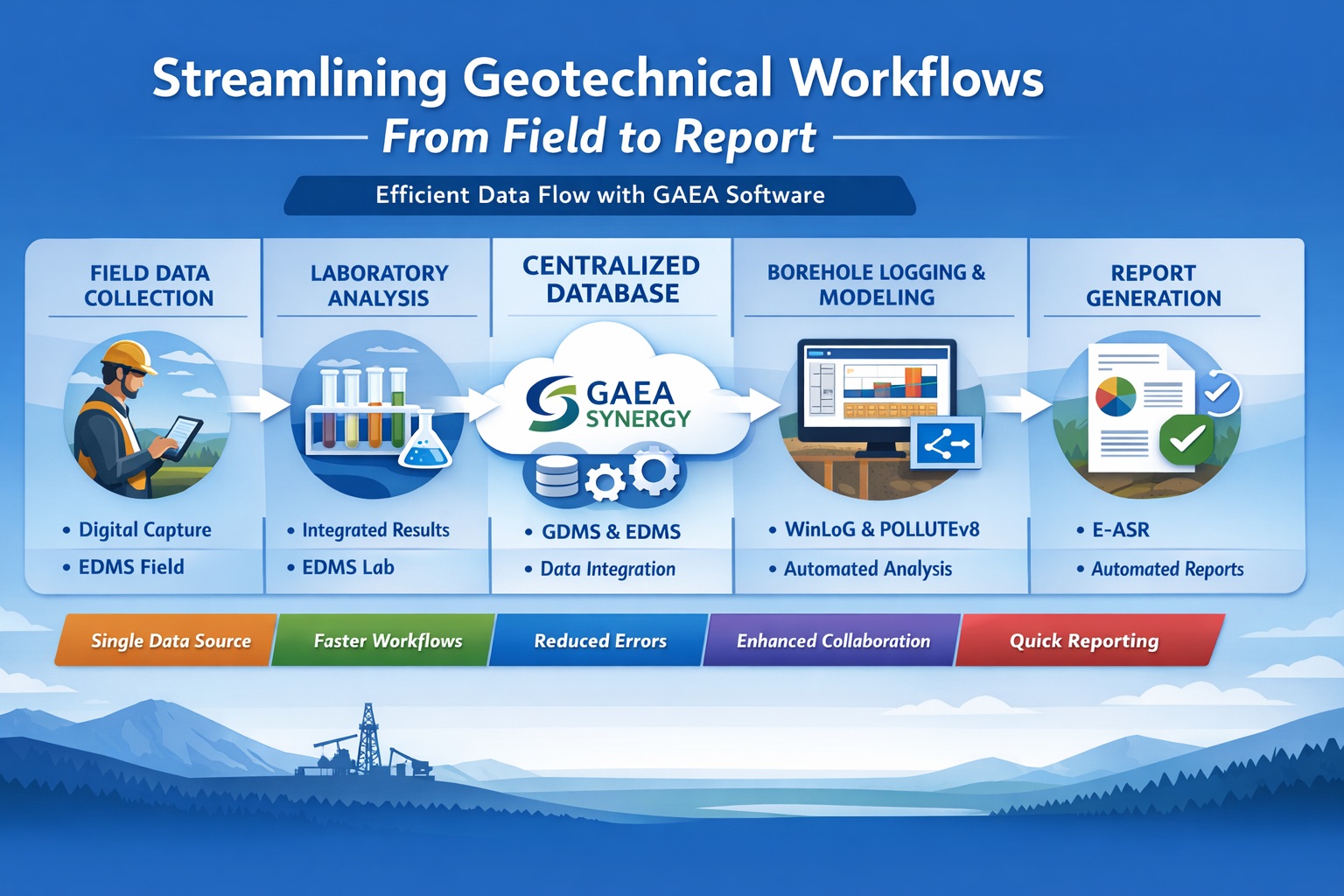
How Does GAEA Enable End-to-End Workflow Integration?
GAEA provides a fully integrated ecosystem built around Gaea Synergy, the central database.
Workflow with GAEA:
- Field Data → EDMS Field
- Central Storage → GaeaSynergy
- Geotechnical Data → GDMS
- Logging → WinLoG
- Lab Data → EDMS Lab
- Modeling → POLLUTEv8
- Reporting → E-ASR
Each component is connected, eliminating manual handoffs.
How Can You Streamline Field Data Collection?
Traditional Approach:
- Paper logs
- Manual transcription
- Delayed data entry
GAEA Approach:
EDMS Field enables:
- Digital data capture
- Real-time validation
- Direct upload to database
Benefits:
- Reduced transcription errors
- Faster data availability
- Improved data quality
How Do You Eliminate Data Silos?
The Problem:
Data exists in:
- Excel files
- PDFs
- Separate software
The Solution:
Use a centralized database.
GAEA Solution:
GaeaSynergy + GDMS + EDMS
- All data stored in one system
- Accessible across modules
- Consistent and up-to-date
How Can Borehole Logging Be Streamlined?
Traditional Logging:
- Manual drafting
- Re-entry of data
- Separate software
GAEA Approach:
WinLoG + WinLoG Field Assistant
- Logs generated directly from database
- Templates ensure consistency
- Instant updates when data changes
Result:
- Faster log production
- Improved accuracy
- Professional outputs
How Do You Integrate Laboratory Data Efficiently?
Challenges:
- Lab data arrives in multiple formats
- Manual entry required
- High error risk
GAEA Solution:
EDMS Lab
- Direct lab data import
- Automatic sample linking
- Built-in validation
Benefits:
- Eliminates manual entry
- Reduces errors
- Speeds up workflows
How Can You Automate Reporting?
Traditional Reporting:
- Copy-paste data
- Manual formatting
- Rework for updates
GAEA Approach:
E-ASR (Environmental Automated Site Reporting)
- Pulls data directly from database
- Uses standardized templates
- Updates automatically
Result:
- Reports generated in hours instead of days
- Consistent formatting
- Reduced human error
How Does Integration Improve Modeling Workflows?
Without Integration:
- Data preparation required
- Risk of inconsistencies
With GAEA:
- Uses centralized data directly
- Eliminates manual setup
- Ensures consistency
Benefit:
Faster and more reliable modeling.
How Does Centralized Data Improve Efficiency?
Key Advantages:
- No duplicate data entry
- Faster data access
- Reduced manual work
GAEA Impact:
- Engineers spend less time on admin tasks
- More time on analysis and design
How Does Workflow Automation Reduce Errors?
Manual workflows introduce:
- Typos
- Missing data
- Incorrect formatting
GAEA Automation:
- Data validation rules
- Automated data flow
- Standardized outputs
Result:
- Higher data accuracy
- More reliable results
How Does Streamlining Improve Collaboration?
Traditional Collaboration:
- Email file sharing
- Version conflicts
GAEA Collaboration:
- Shared database
- Real-time updates
- Multi-user access
Result:
- Teams work simultaneously
- Improved communication
- Faster project delivery
Can Streamlined Workflows Replace Excel?
Yes—and They Should
Excel-based workflows:
- Lack structure
- Are error-prone
- Don’t scale
GAEA Advantage:
- Structured databases
- Automated workflows
- Integrated reporting
How Does Streamlining Support Regulatory Compliance?
Requirements:
- Accurate data
- Traceability
- Standardized reporting
GAEA Provides:
- Audit trails
- Validation rules
- Automated reports
Result:
- Easier compliance
- Reduced risk
What Role Does Cloud Access Play?
Modern workflows require:
- Remote access
- Field-to-office connectivity
GAEA Supports:
- Cloud-enabled deployment
- Secure remote access
- Real-time synchronization
How Does Streamlining Improve Project Timelines?
Traditional Timelines:
- Delays between workflow stages
- Manual processing
GAEA Workflow:
- Instant data availability
- Automated processes
Result:
- Faster turnaround
- Improved client satisfaction
What Are the Biggest Bottlenecks GAEA Eliminates?
1. Manual Data Entry
2. Data Duplication
3. Report Compilation
4. File Management
By removing these bottlenecks, GAEA significantly improves efficiency.
What Is a Practical Implementation Strategy?
Step 1: Centralize Data
Adopt GaeaSynergy + GDMS/EDMS
Step 2: Digitize Field Data
Use EDMS Field
Step 3: Integrate Logging
Implement WinLoG
Step 4: Automate Reporting
Deploy E-ASR
Step 5: Extend to Modeling
Use POLLUTEv8
This phased approach minimizes disruption.
What Is the Key Takeaway?
Streamlining geotechnical workflows is about integration, automation, and centralization.
Without Streamlining:
- Fragmented workflows
- Manual processes
- Increased risk
With GAEA:
- Seamless data flow
- Automated processes
- Faster, more accurate reporting
Conclusion
Geotechnical and environmental projects are becoming more complex, data-driven, and time-sensitive. Traditional workflows—built on disconnected tools and manual processes—can no longer keep up.
Streamlining workflows from field to report requires:
- Centralized data management
- End-to-end integration
- Automation of repetitive tasks
- Real-time collaboration
GAEA Technologies delivers all of this through its integrated ecosystem, enabling engineering firms to:
- Reduce errors
- Improve efficiency
- Accelerate project delivery
- Enhance data quality and compliance
The result is not just better software—but a smarter, faster, and more reliable way to work.
Learn more about our Software Solutions
- GaeaSynergy Platform for Geoscientific Analysis and Visualization
- WinLoG: Borehole and Well Logs
- WinFence: Cross-sections and Fence Diagrams
- GDMS: Geotechnical Data Management System
- EDMS: Environmental Data Management System
- POLLUTEv8: Contaminant Transport Modeling and Landfill Design
- E-ASR: Automated Environmental Reporting
Related Articles
- How to Evaluate Geotechnical & Environmental Software (Buyer’s Guide)
- GaeaSynergy: Integrated Geological, Geotechnical, and Environmental Data Management Platform
- Integrated vs Standalone Geotechnical Software: Which Is Better?
- Top Features to Look for in Geotechnical & Environmental Software
- Why Centralized Data Management Is Critical for Geotechnical Projects
- How Automation Improves Efficiency in Environmental Data Management
- Cloud vs Desktop Geotechnical Software: Pros and Cons
- How to Automate Environmental Reporting
- How Environmental Software Helps with Regulatory Compliance
- How to Run a Successful Software Pilot Project
- Understanding Total Cost of Ownership for Engineering Software
- How to Calculate ROI for Geotechnical and Environmental Software Investments
- Top 10 Mistakes When Buying Engineering Software (And How to Avoid Them)
- Future Trends in Geotechnical and Environmental Software
- Step-by-Step Guide to Selecting Engineering Software