

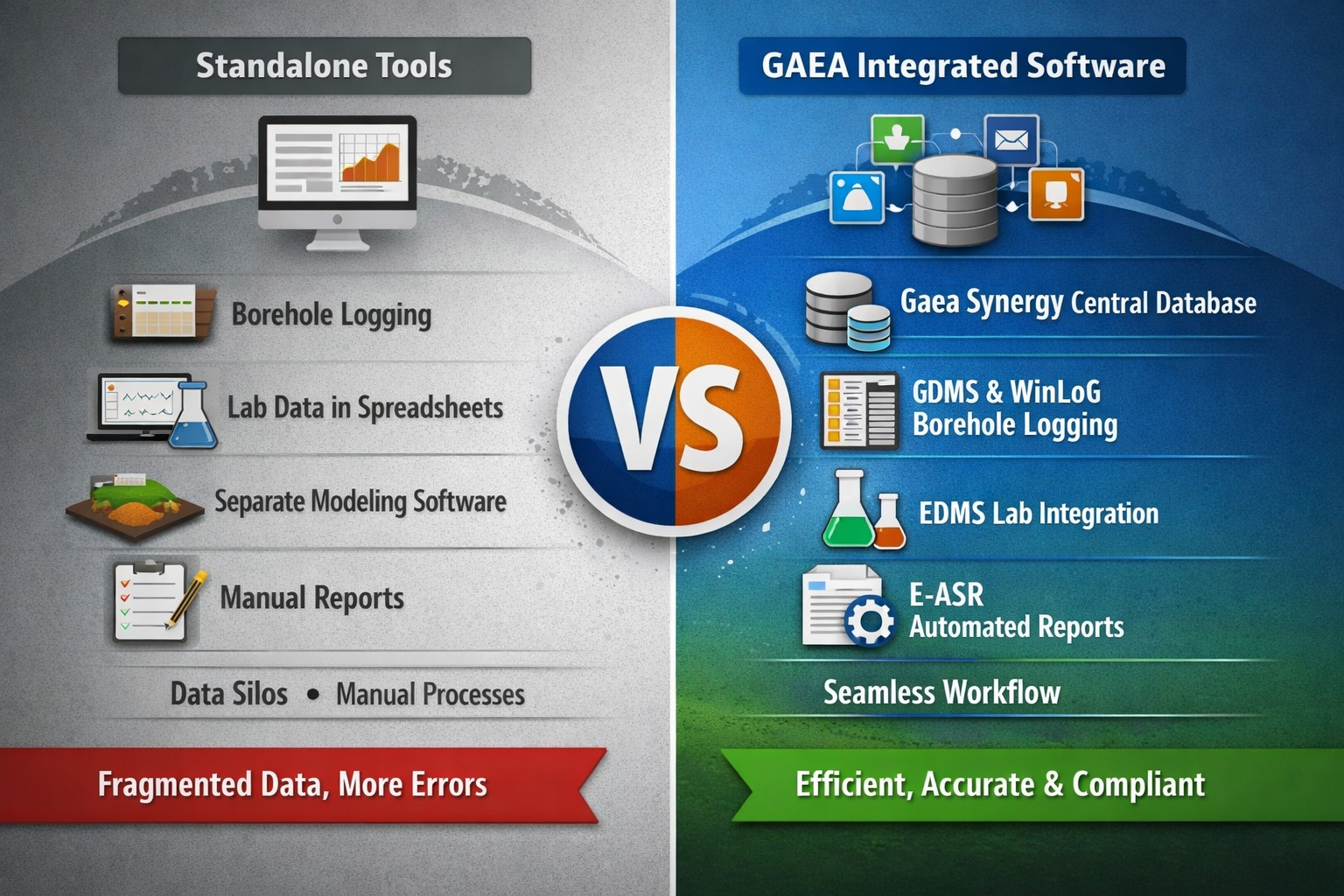
As geotechnical and environmental projects become more data-intensive, engineering firms are facing a critical decision: should you rely on standalone tools or adopt an integrated software ecosystem?
For organizations using—or considering—GAEA software solutions, this decision is especially important. GAEA’s platform is built around integration, but many firms still operate with a mix of legacy standalone tools.
This article explores the integrated vs standalone debate through the lens of GAEA Technologies, helping you understand where each approach fits—and why integration is increasingly becoming the standard.
Understanding the Two Approaches in a GAEA Context
Standalone Software in Typical Workflows
Many geotechnical firms historically built their workflows using standalone tools:
- Borehole logging software
- Spreadsheet-based lab data tracking
- Separate groundwater modeling tools
- Independent report generation systems
In these environments, engineers manually move data between tools—often re-entering or reformatting it multiple times.
While this approach can work, it introduces inefficiencies that become more pronounced as projects scale.
Integrated Software with GAEA
GAEA Technologies takes a fundamentally different approach by offering an integrated ecosystem of geotechnical and environmental solutions, including:
- GaeaSynergy – Central data management platform
- GDMS (Geotechnical Data Management System) – Borehole, field, and subsurface data
- EDMS (Environmental Data Management System) – Environmental sampling and lab data
- WinLoG – Borehole logging and visualization
- POLLUTEv8 – Contaminant transport modeling
- E-ASR – Automated environmental reporting
Instead of operating in silos, these tools are designed to share a common database and workflow structure, enabling seamless data flow from field collection to final reporting.
Key Differences: GAEA Integrated vs Standalone Workflows
| Feature | Standalone Workflow | GAEA Integrated Workflow |
|---|---|---|
| Data Storage | Multiple files, spreadsheets | Centralized database (Synergy) |
| Data Entry | Repeated across tools | Enter once, used everywhere |
| Borehole Logs | Separate logging tool | Direct integration with WinLoG |
| Lab Results | Manual import/export | Integrated via EDMS Lab |
| Modeling | Disconnected inputs | Directly linked datasets |
| Reporting | Manual compilation | Automated via E-ASR |
| Collaboration | Limited file sharing | Multi-user, network/cloud |
| QA/QC | Manual checks | Built-in validation |
Advantages of Standalone Software
Even within GAEA environments, standalone tools can still play a role.
1. Specialized Analysis Outside Core Workflow
Some engineers may prefer standalone tools for:
- Advanced numerical modeling
- Proprietary calculations
- One-off analyses
These tools can complement GAEA rather than replace it.
2. Familiarity and Legacy Systems
Many firms have long relied on:
- Excel-based workflows
- Older logging software
- Custom-built tools
Transitioning away from these systems can require time and training.
3. Lower Initial Barrier
Standalone tools may seem easier to adopt because:
- They don’t require system-wide implementation
- They can be used immediately
- They avoid organizational change
However, this short-term convenience often comes at a long-term cost.
Limitations of Standalone Workflows
1. Data Silos and Duplication
Without integration:
- Borehole data lives in one system
- Lab results in another
- Reports in separate documents
This leads to:
- Duplicate data entry
- Version inconsistencies
- Increased risk of error
2. Inefficient Reporting
Standalone workflows require:
- Copying data into reports
- Formatting manually
- Re-checking for accuracy
With complex environmental or geotechnical projects, this can consume significant time.
3. Limited Traceability
Tracking data lineage becomes difficult:
- Where did this value come from?
- Has it been updated everywhere?
This is a major concern for regulatory compliance.
4. Poor Scalability
As projects grow:
- More tools are added
- Workflows become fragmented
- Management becomes difficult
This is where integrated systems like GAEA provide a clear advantage.
Advantages of GAEA’s Integrated Approach
1. Single Source of Truth with Gaea Synergy
At the core of GAEA’s ecosystem is Gaea Synergy, which acts as a centralized database.
This ensures:
- All users access the same data
- Updates propagate across all modules
- Version control is maintained
Instead of juggling files, teams work from a live, unified dataset.
2. Seamless Field-to-Office Workflow
With GAEA integration:
- Field data collected in EDMS Field flows directly into the database
- Borehole logs in WinLoG update automatically
- Data becomes instantly available for analysis
This eliminates delays and reduces manual handling.
3. Integrated Laboratory Data Management
Using EDMS Lab, lab results:
- Are imported directly from laboratories
- Automatically linked to samples
- Instantly available for reporting and analysis
This removes one of the most error-prone steps in traditional workflows.
4. Automated Reporting with E-ASR
GAEA’s E-ASR (Environmental Automated Site Reporting) transforms reporting workflows.
Instead of manually compiling reports:
- Data is pulled directly from the database
- Templates generate consistent outputs
- Updates are reflected instantly
This can reduce reporting time from days to hours.
5. Direct Integration with Modeling Tools
With tools like POLLUTEv8, GAEA enables:
- Direct use of site data in models
- Faster setup of simulations
- Improved consistency between datasets
This eliminates the need for manual data preparation.
6. Improved QA/QC and Compliance
Integrated workflows provide:
- Built-in validation rules
- Audit trails
- Standardized processes
This is critical for:
- Regulatory submissions
- Environmental compliance
- Risk management
7. Multi-User Collaboration
GAEA supports:
- Network licensing
- Cloud deployment
- Simultaneous multi-user access
Teams can collaborate in real time without worrying about file conflicts.
Real-World Workflow Comparison
Standalone Workflow Example
- Field data collected on paper or spreadsheets
- Data manually entered into logging software
- Lab results imported via CSV
- Data re-entered into modeling software
- Reports created manually in Word
Result:
- Time-consuming
- Error-prone
- Difficult to scale
GAEA Integrated Workflow Example
- Field data captured digitally (EDMS Field)
- Data stored in Gaea Synergy
- Borehole logs generated in WinLoG
- Lab results integrated via EDMS Lab
- Data used directly in POLLUTEv8
- Reports generated automatically with E-ASR
Result:
- Streamlined workflow
- Reduced errors
- Faster project delivery
When Should You Use Standalone Tools with GAEA?
Even in an integrated environment, standalone tools can be useful:
✔ Advanced or niche analysis
Use standalone tools when specialized modeling exceeds built-in capabilities.
✔ Legacy projects
Maintain existing workflows while gradually transitioning to GAEA.
✔ External collaboration
When working with partners using different systems.
When GAEA Integration Delivers Maximum Value
GAEA’s integrated ecosystem is most beneficial when:
✔ Managing large datasets
- Multiple boreholes
- Extensive lab results
✔ Handling multi-phase projects
- Site investigation
- Monitoring
- Remediation
✔ Ensuring compliance
- Environmental regulations
- Audit requirements
✔ Scaling operations
- Growing teams
- Increasing project complexity
Hybrid Strategy: Practical Implementation
Most firms don’t switch overnight. A practical approach is:
Phase 1: Centralize Data
Adopt Gaea Synergy + GDMS/EDMS as the core database.
Phase 2: Integrate Logging and Lab Data
Connect WinLoG and EDMS Lab.
Phase 3: Automate Reporting
Implement E-ASR templates.
Phase 4: Extend to Modeling
Integrate POLLUTEv8 and other tools.
This phased approach minimizes disruption while maximizing ROI.
Cost Considerations: GAEA vs Standalone
Standalone Costs (Hidden)
- Time spent on data entry
- Error correction
- Inefficient workflows
- Training across multiple tools
GAEA Integrated Costs
- Initial licensing
- Implementation
- Training
Long-Term ROI
GAEA’s integrated approach typically delivers:
- Reduced labor costs
- Faster project turnaround
- Improved data quality
- Better client satisfaction
Over time, these benefits outweigh the initial investment.
Future-Proofing Your Workflow with GAEA
GAEA’s integrated ecosystem aligns with industry trends:
Cloud Deployment
- Remote access
- Scalable infrastructure
Mobile Data Collection
- Real-time field integration
Automation
- Faster reporting
- Reduced manual work
Data-Driven Engineering
- Better insights
- Improved decision-making
Final Verdict: Integrated (GAEA) vs Standalone
Standalone Software Is Better If:
- You need quick, simple tools
- Your projects are small and isolated
- Budget is extremely limited
GAEA Integrated Software Is Better If:
- You want a scalable, future-proof solution
- Your projects involve complex data workflows
- You need accuracy, efficiency, and compliance
Conclusion
For modern geotechnical and environmental projects, the question is no longer just “which software is better?”—it’s “which workflow will support your growth?”
Standalone tools still have their place, especially for specialized tasks. However, they struggle to keep up with the increasing demands for:
- Data integration
- Collaboration
- Automation
- Regulatory compliance
GAEA Technologies addresses these challenges by providing a fully integrated ecosystem that connects every stage of the project lifecycle.
The result is not just better software—but a better way of working.
Learn more about our Software Solutions
- GaeaSynergy Platform for Geoscientific Analysis and Visualization
- WinLoG: Borehole and Well Logs
- WinFence: Cross-sections and Fence Diagrams
- GDMS: Geotechnical Data Management System
- EDMS: Environmental Data Management System
- POLLUTEv8: Contaminant Transport Modeling and Landfill Design
- E-ASR: Automated Environmental Reporting
Related Articles
- How to Evaluate Geotechnical & Environmental Software (Buyer’s Guide)
- GaeaSynergy: Integrated Geological, Geotechnical, and Environmental Data Management Platform
- Top Features to Look for in Geotechnical & Environmental Software
- Why Centralized Data Management Is Critical for Geotechnical Projects
- How to Streamline Geotechnical Workflows from Field to Report
- How Automation Improves Efficiency in Environmental Data Management
- Cloud vs Desktop Geotechnical Software: Pros and Cons
- How to Automate Environmental Reporting
- How Environmental Software Helps with Regulatory Compliance
- How to Run a Successful Software Pilot Project
- Understanding Total Cost of Ownership for Engineering Software
- How to Calculate ROI for Geotechnical and Environmental Software Investments
- Top 10 Mistakes When Buying Engineering Software (And How to Avoid Them)
- Future Trends in Geotechnical and Environmental Software
- Step-by-Step Guide to Selecting Engineering Software