

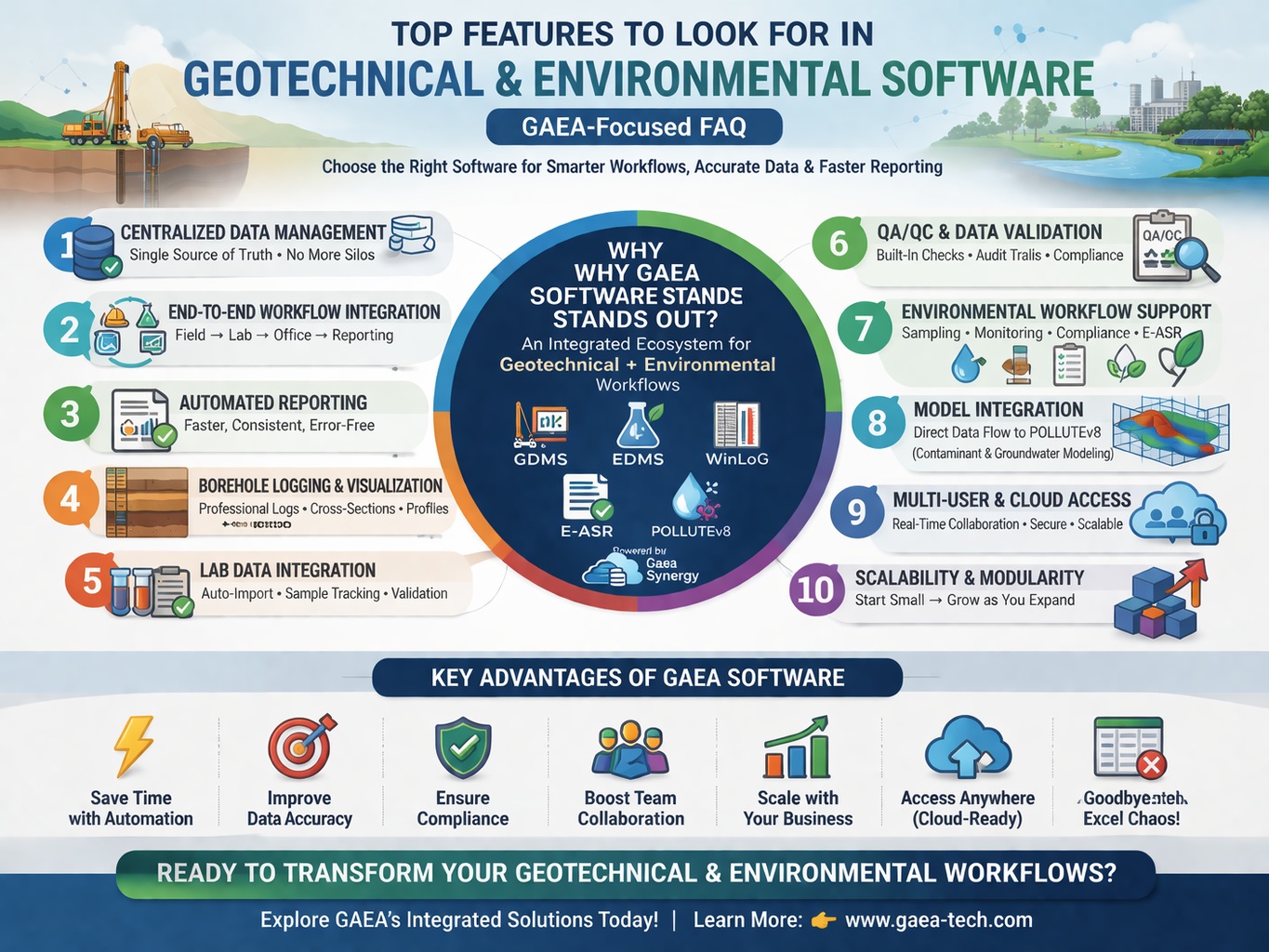
Selecting the right geotechnical and environmental software is one of the most important technology decisions your firm can make. With increasing project complexity, regulatory pressure, and data volume, the software you choose must do more than just “work”—it must connect workflows, ensure data integrity, and scale with your business.
Why Is Software Selection So Important in Geotechnical Engineering?
Geotechnical and environmental projects generate massive amounts of data, including:
- Borehole logs
- Laboratory test results
- Groundwater monitoring data
- Environmental sampling records
Managing this data effectively is critical for decision-making and compliance. Structured systems allow engineers to store, reuse, and generate reports directly from data, reducing manual work and improving accuracy.
What Is the Most Important Feature to Look For?
Centralized Data Management (Single Source of Truth)
The most critical feature is a centralized database that stores all project data in one place.
Why It Matters:
- Eliminates duplicate data entry
- Ensures consistency across teams
- Improves traceability
How GAEA Delivers:
Gaea Synergy + GDMS + EDMS provide a unified data environment where:
- Borehole logs
- Lab results
- Environmental data
are all stored in a structured database.
GDMS, for example, integrates testing and data storage in a managed system, supporting a wide range of geotechnical tests.
Should Software Integrate Field, Lab, and Office Workflows?
Yes — End-to-End Workflow Integration Is Essential
Modern geotechnical software should connect:
- Field data collection
- Laboratory analysis
- Office interpretation and reporting
Why It Matters:
Disconnected systems lead to:
- Manual data transfer
- Errors
- Delays
Effective platforms track data from sample collection to final results, including chain-of-custody and status updates.
How GAEA Delivers:
- EDMS Field captures data in the field
- EDMS Lab integrates laboratory results
- GDMS + WinLoG handle borehole data and visualization
All components work together seamlessly.
How Important Is Automated Reporting?
Extremely Important
Reporting is one of the most time-consuming tasks in geotechnical and environmental projects.
Key Capabilities to Look For:
- Template-based reporting
- Automatic data population
- Standardized outputs
Why It Matters:
- Reduces manual formatting
- Ensures consistency
- Speeds up delivery
How GAEA Delivers:
E-ASR (Environmental Automated Site Reporting) allows you to:
- Generate reports directly from the database
- Maintain consistency across projects
- Update reports instantly when data changes
Does the Software Support Borehole Logging and Visualization?
Borehole Logging Is a Core Requirement
Borehole logs remain a fundamental deliverable in geotechnical engineering.
Key Features to Look For:
- Customizable log templates
- Cross-sections and profiles
- Integration with database
How GAEA Delivers:
- WinLoG provides advanced borehole logging and visualization
- Direct integration with GDMS ensures logs are generated from real data
This eliminates manual drafting and improves accuracy.
How Important Is Laboratory Data Integration?
Critical for Data Accuracy and Efficiency
Lab data is often one of the biggest bottlenecks in geotechnical workflows.
Features to Look For:
- Automated lab imports
- Sample tracking
- Data validation
Why It Matters:
Manual lab data entry is:
- Time-consuming
- Error-prone
How GAEA Delivers:
EDMS Lab:
- Imports lab data directly
- Links results to samples automatically
- Tracks the full lifecycle of environmental data
EDMS also provides auditable processes and notifications, ensuring compliance and traceability.
What About Data Quality and QA/QC Features?
Built-In Validation Is Essential
Errors in geotechnical data can lead to costly design issues.
Look For:
- Validation rules
- Audit trails
- Data consistency checks
How GAEA Delivers:
- Structured database design
- Automated validation
- Full auditability
This ensures your data is reliable and defensible.
Does the Software Support Environmental Workflows?
Yes — Especially for Compliance
Environmental projects require:
- Sampling tracking
- Regulatory reporting
- Contaminant analysis
How GAEA Delivers:
EDMS + E-ASR support:
- Environmental site assessments
- Compliance documentation
- Automated reporting workflows
This makes GAEA particularly strong for geoenvironmental consulting.
How Important Is Integration with Modeling Tools?
Increasingly Important
Modern projects require:
- Contaminant transport modeling
- Groundwater analysis
- Risk assessment
How GAEA Delivers:
POLLUTEv8 integrates with GAEA’s data systems, allowing:
- Direct use of site data in models
- Faster simulation setup
- Consistent datasets
Should the Software Support Multi-User Collaboration?
Yes — Collaboration Is Critical
Look For:
- Multi-user access
- Network licensing
- Cloud capabilities
Why It Matters:
- Teams work simultaneously
- Reduces version conflicts
- Improves efficiency
How GAEA Delivers:
- Network and cloud deployment options
- Shared databases
- Real-time collaboration
How Important Is Scalability?
Essential for Growing Firms
Your software should scale with:
- More users
- Larger datasets
- More complex projects
How GAEA Delivers:
GAEA’s modular ecosystem allows you to:
- Start with GDMS or EDMS
- Add modules like E-ASR and POLLUTEv8
- Expand as your needs grow
Does the Software Support Data Standardization?
Yes — and It’s Often Overlooked
Standardized data ensures:
- Consistent reporting
- Easier data sharing
- Better long-term usability
How GAEA Delivers:
- Structured database schemas
- Standardized workflows
- Consistent reporting outputs
What About Automation?
Automation Is a Major Efficiency Driver
Look for automation in:
- Data entry
- Reporting
- Workflow processes
How GAEA Delivers:
- Automated report generation (E-ASR)
- Automated data integration (EDMS Lab)
- Automated logging (WinLoG + GDMS)
Is Cloud or Remote Access Important?
Increasingly Yes
Modern teams require:
- Remote access
- Field-to-office connectivity
- Cloud scalability
How GAEA Delivers:
- Cloud-enabled deployment via Gaea Synergy
- Remote database access
- Support for distributed teams
15. How Important Is Data Security?
Critical for Compliance and Risk Management
Look For:
- Access control
- Data backups
- Secure databases
How GAEA Delivers:
- User permissions
- Secure centralized database
- Controlled access to sensitive data
Should the Software Be Easy to Use?
Yes — Usability Drives Adoption
Even the most powerful software fails if users don’t adopt it.
Look For:
- Intuitive interface
- Customizable workflows
- Training support
How GAEA Delivers:
- User-friendly modules
- Configurable workflows
- Designed for engineers, not IT specialists
Can the Software Replace Excel-Based Workflows?
Yes — and It Should
Many firms rely heavily on Excel, but this creates:
- Data silos
- Version control issues
- Increased error risk
How GAEA Helps:
- Replaces spreadsheets with structured databases
- Automates calculations and reporting
- Improves data consistency
What Features Improve ROI the Most?
The highest ROI features include:
1. Automation
2. Integration
3. Centralized Data
4. Reporting Efficiency
GAEA excels in all four areas, making it a strong long-term investment.
What Makes GAEA Different from Other Software?
Unlike many competitors, GAEA:
- Focuses on end-to-end integration
- Combines geotechnical + environmental workflows
- Offers modular scalability
- Emphasizes automation and data integrity
While many platforms provide individual tools, GAEA delivers a complete ecosystem.
What Is the Most Important Takeaway?
The best geotechnical and environmental software is not just about features—it’s about how those features work together.
With Standalone Tools:
- Data is fragmented
- Workflows are manual
- Errors are more likely
With GAEA:
- Data is centralized
- Workflows are automated
- Projects move faster with greater accuracy
Conclusion
Choosing geotechnical and environmental software requires careful evaluation of features that impact:
- Data quality
- Workflow efficiency
- Collaboration
- Scalability
Key features to prioritize include:
- Centralized data management
- Workflow integration
- Automated reporting
- Lab and field integration
- QA/QC and compliance tools
GAEA Technologies stands out by delivering all of these within a fully integrated ecosystem, helping engineering firms transition from fragmented workflows to connected, efficient, and future-ready operations.
Learn more about our Software Solutions
- GaeaSynergy Platform for Geoscientific Analysis and Visualization
- WinLoG: Borehole and Well Logs
- WinFence: Cross-sections and Fence Diagrams
- GDMS: Geotechnical Data Management System
- EDMS: Environmental Data Management System
- POLLUTEv8: Contaminant Transport Modeling and Landfill Design
- E-ASR: Automated Environmental Reporting
Related Articles
- How to Evaluate Geotechnical & Environmental Software (Buyer’s Guide)
- GaeaSynergy: Integrated Geological, Geotechnical, and Environmental Data Management Platform
- Integrated vs Standalone Geotechnical Software: Which Is Better?
- Why Centralized Data Management Is Critical for Geotechnical Projects
- How to Streamline Geotechnical Workflows from Field to Report
- How Automation Improves Efficiency in Environmental Data Management
- Cloud vs Desktop Geotechnical Software: Pros and Cons
- How to Automate Environmental Reporting
- How Environmental Software Helps with Regulatory Compliance
- How to Run a Successful Software Pilot Project
- Understanding Total Cost of Ownership for Engineering Software
- How to Calculate ROI for Geotechnical and Environmental Software Investments
- Top 10 Mistakes When Buying Engineering Software (And How to Avoid Them)
- Future Trends in Geotechnical and Environmental Software
- Step-by-Step Guide to Selecting Engineering Software